

How to Build a ChatGPT Plugin: A Comprehensive Guide

Want to know more? — Subscribe
Building a ChatGPT plugin extends its capabilities, customizing it for specific needs and applications. Designed to understand, generate, and mimic human-like…
Building a ChatGPT plugin extends its capabilities, customizing it for specific needs and applications. Designed to understand, generate, and mimic human-like text, ChatGPT is already more than a simple chatbot. It illustrates the progress of AI in understanding the nuances of human language.
In this article, Softermii explores the basics of plugins and offers a guide for building your own. Keep reading to explore the development insights and examples of popular ChatGPT plugins across various industries.
Want a skimmable version?
Get a quick overview of our article with AI to access all the important information quickly.
Generate AI SummaryHide summary
Want a skimmable version?
Get a quick overview of our article with AI to access all the important information quickly.
Generate AI SummaryHide summaryA comprehensive guide to building a ChatGPT plugin — what plugins are, why they matter for chatbots, the prerequisites, and the build steps.
Understanding the Basics of Plugins
First of all, we need to understand the concept of a plugin and its practical applications.
The plugin adds specific features to an existing program without changing the core structure. Plugins enhance its utility, flexibility, and efficiency.
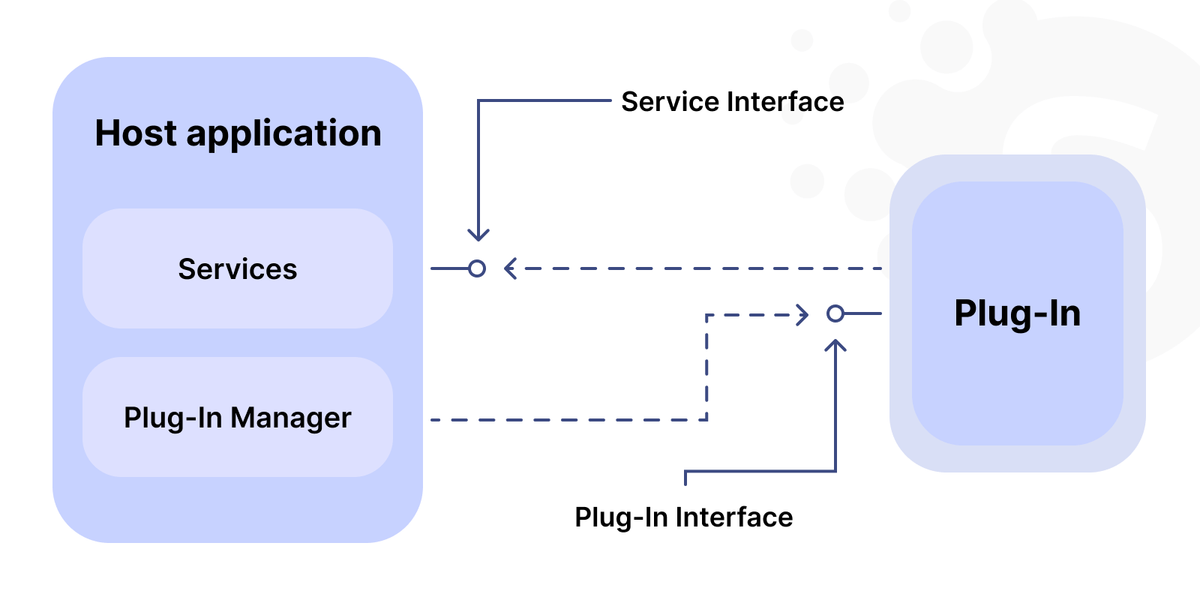
In the software industry, plugins are ubiquitous and serve a variety of purposes:
- Content Management Systems (CMS). Enable platforms like WordPress and Joomla to offer SEO tools, social media feeds, and e-commerce functionalities to websites.
- Audio/Video Editing Software. Offer advanced editing features or effects. Programs like Adobe Premiere Pro and Audacity use plugins for adding transitions, audio modifications, etc.
- Web Browsers. Plugins in browsers add ad-blocking, password management, and enhanced privacy features.
- Data Analytics Tools. Add new data visualization methods or integrate more data sources.
- Gaming. Modify or enhance gaming experiences with new levels, characters, or capabilities.
- Development Environments. IDEs like Visual Studio Code or IntelliJ IDEA use plugins for code linting, debugging, and version control.
Importance of Plugins in Chatbots
You can find chatbots across various sectors, from healthcare to fintech and e-commerce. However, the needs of these industries are distinct and often require specialized features. Plugins allow for this level of customization.
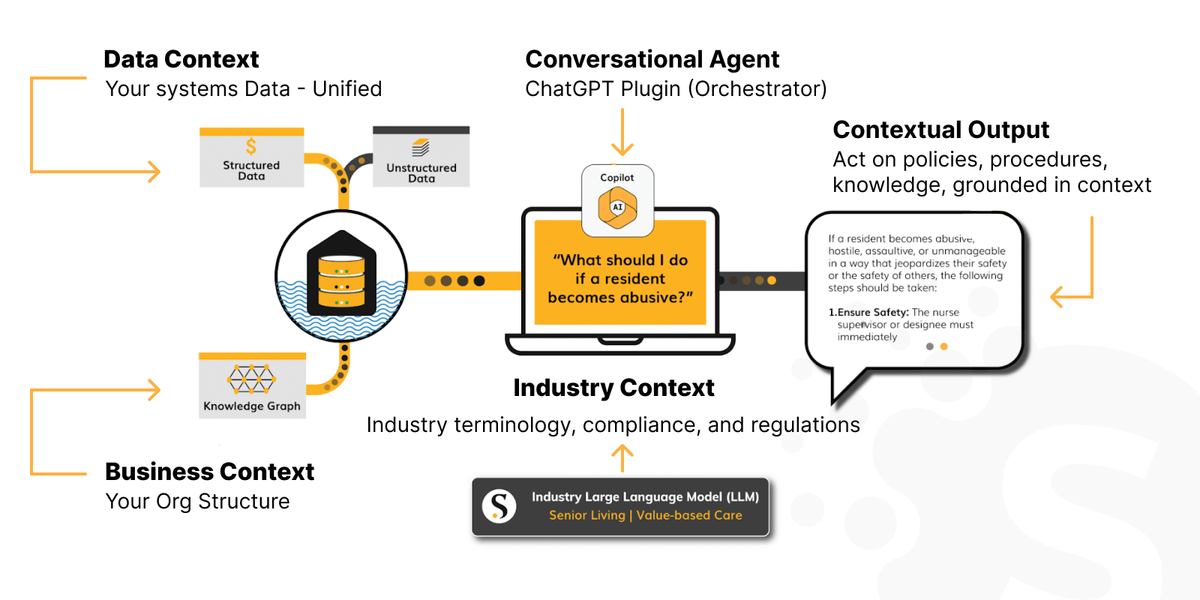
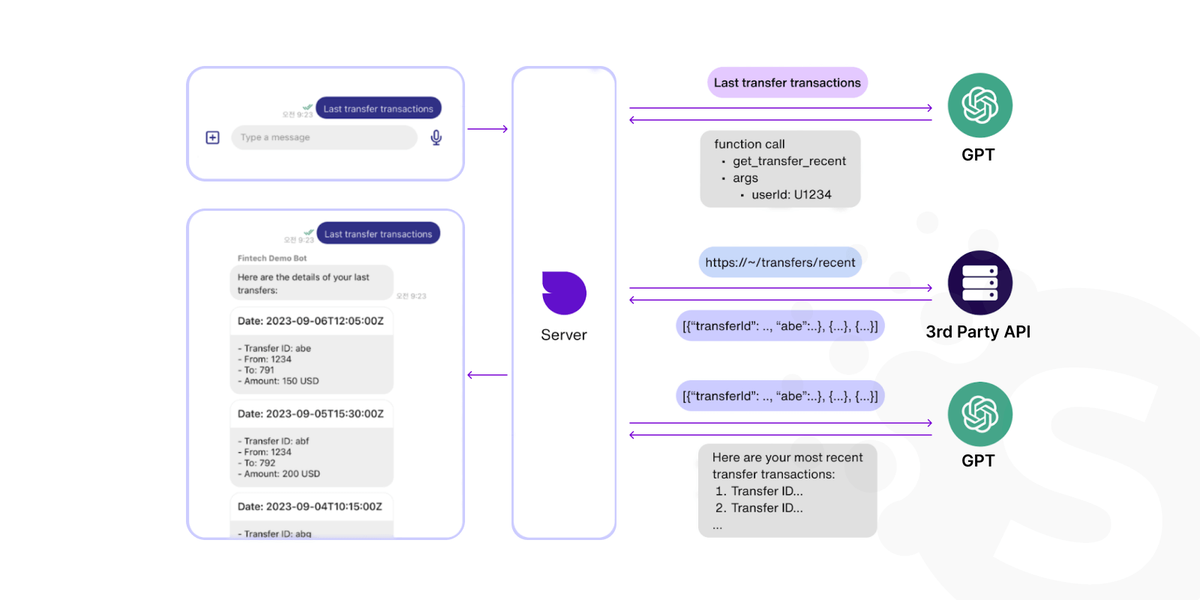
For example, a healthcare chatbot may use a plugin to understand medical terminology and integrate with EHRs. Likewise, a fintech chatbot with ChatGPT enables it to process payments and understand financial jargon.
Prerequisites for Developing the ChatGPT Plugin
Before starting the process of building a ChatGPT plugin, your development team must prepare adequately. They ensure they have all the necessary tools and understand the basic requirements for a successful project. Below, we outline the essential components before creating a ChatGPT plugin.
Basic Knowledge and Skills
First, you must find a skilled development team to make a ChatGPT plugin. Here are the essential qualifications and skills that they must be familiar with:
1. Understanding of ChatGPT's Architecture
The ChatGPT's system combines several machine learning models, data processing pipelines, and real-time analytics. Developers should know how the model processes inputs and returns outputs and how it integrates with other services. Understanding these components allows for making efficient and compatible plugins.
2. Familiarity with API Integrations
APIs connect the plugin to ChatGPT and other services or databases. Your team must know how to interact with APIs, manage API keys, and handle request and response data. This skill enables the extension of the capabilities of ChatGPT by connecting it to other AI models or specialized computing tasks.
Necessary Tools and Software
After you've found the development team to create your own ChatGPT plugin, they will define the essential tech stack for the project. Here are some of the technologies they may use.
| List of Development Tools | List of Development Tools |
|---|---|
| Frontend | • HTML/CSS for basic layout and styling. • JavaScript for frontend logic, handling user inputs and interacting with APIs. |
| Frontend Frameworks (Optional) | Angular, React, or Vue.js when building a complex user interface. |
| Backend | Python, Node.js, Java. |
| Web Framework | Flask or Django for Python; Express.js for Node.js. |
| API Handling Libraries | Requests for Python, Axios for JavaScript. |
| Integrated Development Environment (IDE) | Visual Studio Code, IntelliJ IDEA, or PyCharm for coding and debugging. |
| Version Control System | Git for tracking changes in your code and collaborating with others. |
| API Testing Tools | Postman or similar tools for testing APIrequests and responses with JSON payloads. |
| Authentication and Data Encryption | • OAuth or JWT for secure API interactions; • OpenSSL for secure data transmission. |
| DevOps and Deployment | • Docker for creating portable application containers. • Jenkins, GitLab CI, or GitHub Actions for automated testing and deployment. |
| Dependency Managers | Programs like npm for JavaScript or pip for Python to manage libraries and packages. |
| Code Linters and Formatters | Tools like ESLint for JavaScript or Pylint for Python to maintain code quality. |
| Database Management Tools | Depending on your needs, MySQL Workbench or MongoDB Compass may be essential. |
| Debugging Tools | IDE must have robust debugging features; otherwise, external tools like JDebug or WinDbg may be useful. |
| DocumentationTools | • Swagger for APIdocumentation; • Markdown files for code and usage documentation. |
| Collaboration Tools | • Slack or Microsoft Teams for team communication; • Jira or Asana for task management. |
Step-by-Step Guide to Building a ChatGPT Plugin
The development of ChatGPT plugin involves several steps. Each phase of this process ensures the developed tool aligns with your initial vision and meets your target audience's needs. Let's now explore each stage and uncover its unique details.
Ideation, Planning, and Design
The first step is to define what you aim to achieve when creating a ChatGPT extension. Is it meant to provide real-time weather updates, integrate with a healthcare system, or help with transactions? Having a clear goal will guide the entire development process.
Now, you need an instruction list for the development. List down the core features your plugin must have and some extra functionalities. It might involve creating user stories or flow diagrams to visualize how the plugin will interact with ChatGPT and end-users.
Then, the design team conceptualizes the user interface and experience, depending on the complexity of the plugin. This blueprint can vary from basic command-line interfaces to more complex graphical components.
Setting up the Development Environment
The choice of programming language will dictate the toolsdevelopers need when building an AI platform. Their following steps include:
- ensure that all the necessary software is installed, and check for app compatibility to prevent any potential issues;
- configure workspace to streamline the development process;
- establish a version control system;
- define code style guidelines;
- prepare build configurations.
Project Calculator
Get the detailed project estatimation – choose the details of your product and calculate the quote of the development
Calculate nowCoding the Plugin
The strategy execution begins here as the structural foundation is laid down. The team creates the files and directories to house the code, assets, and dependencies. They connect a plugin to the ChatGPT API to enable seamless interactions. Depending on its functionality, it may involve sending user inputs to ChatGPT and receiving generated text or more complex operations.
Here are some tips that could be useful for any developer during CharGPT plugin development:
- use code commenting;
- implement modularization;
- make frequent commits to version control;
- adhere to DRY (Don't Repeat Yourself) and SOLID principles.
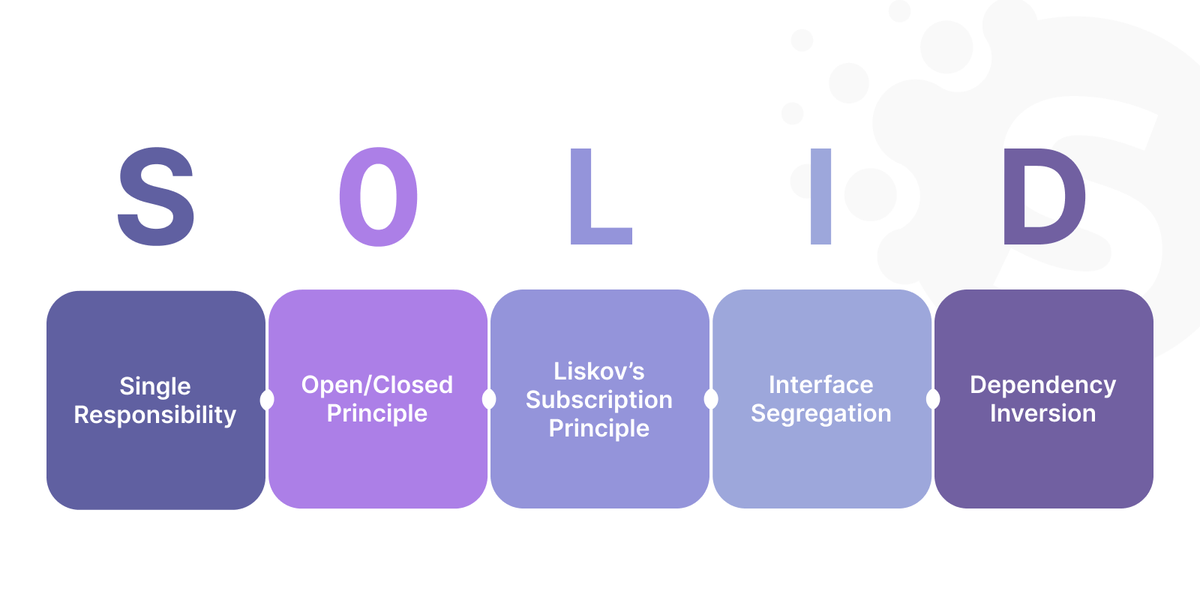
These habits will make it easier for anyone to revisit and understand the code in the future.
Testing and Debugging
The plugin must undergo rigorous testing to ensure it functions as intended. QA specialists usually employ different testing methodologies, including:
- unit testing;
- integration testing;
- end-to-end testing.
Each of these test cases validates various aspects of your plugin.
During the debugging phase, issues are addressed. The team uses IDE debugging tools and may consider additional software for robust debugging capabilities.
Documentation and User Guide
The last two steps before publishing a tool into a plugin storeare as follows:
- Create a manual detailing the plugin's architecture, features, and functionalities.
- Provide a user guide explaining how to install, configure, and use the plugin.
Tips for a Successful Plugin
Creating a ChatGPT plugin involves more than writing working code. Developers must balance functionality, user-friendliness, and security during its development. We've collected tips for optimizing your plugin's success across these critical areas.
Ensuring Compatibility
Compatibility ensures your plugin works seamlessly with ChatGPT, providing a fluid user experience. Moreover, this harmonious relationship must be maintained over time.
Keeping Up with ChatGPT's Updates
ChatGPT, like any technology, has regular upgrades. New features or updates can impact the functionality of your plugin. It's important to watch the latest changes to make necessary adjustments at the right time.
Avoiding Common Pitfalls in Plugin Development
Some common pitfalls include:
- code conflicts;
- memory leaks;
- poorly managed dependencies;
- hardcoding values.
Any of them can jeopardize your plugin's compatibility. Vigilant testing and code reviews can address them, ensuring your plugin is robust and reliable.
$200 million
According to BusinessofApps, OpenAI has projected revenues of $200 million for 2023 and $1 billion by 2024
Prioritizing User Experience
Prioritizing user experience is crucial for the success of any software product. The most amazing features will eventually fade if the tool is not user-friendly. Here's how to address this issue.
Importance of Intuitive Design
An appealing, intuitive design is also functional and straightforward to navigate. With such a design, users will unlikely need a manual to use your plugin. Aim for a logical and consistent layout, ensuring essential features are readily accessible.
Gathering Feedback and Making Necessary Adjustments
Collecting user feedback is invaluable for any UX design. Use beta tests, surveys, or user reviews to gather insights and understand what needs improvement. Be prepared to make adjustments to your plugin based on this feedback.
Security and Privacy Considerations
With increasing cyber threats, security and privacy have become non-negotiable and require meticulous attention.
Protecting User Data
Your plugin must follow data protection regulations like GDPR to safeguard user data. We also strongly advise to implement robust encryption algorithms or secure data storage.
Ensuring Secure Connections and Data Transfers
Always use secure, authenticated APIs to fetch or send data. Use secure channels for communication, such as HTTPS and WebSockets secured with TLS, to secure data transfers.
Examples of Popular ChatGPT Plugins
The versatility of ChatGPT plugins extends across various industries. Each plugin enhances ChatGPT's utility, offering specialized features that cater to specific needs. Below, we'll explore some of these stand-out plugins in healthcare, fintech, real estate, e-commerce, and data science.
Healthcare: Vivian Health Plugin
The Vivian Health Plugin is a job search assistant in the healthcare sector. Its search algorithm shows healthcare jobs aligning with the user's preferences. Users can filter jobs by location, specialty, pay rate, and job type, such as travel nursing or permanent positions.
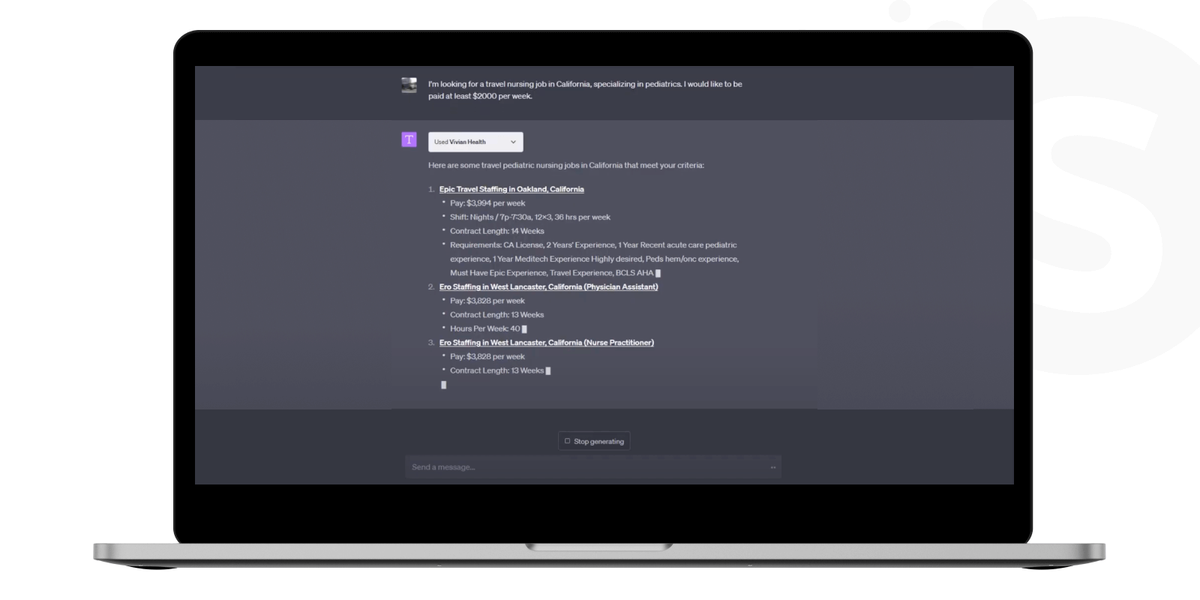
This plugin transforms ChatGPT into a personalized career consultant for healthcare professionals. By engaging in a series of questions, it captures user preferences for a customized job search. Once preferences are set, the plugin finds relevant job openings, saving users valuable time and effort. It also provides direct links to apply for jobs, making the entire job search process streamlined and efficient.
E-Commerce: Klarna
Klarna's ChatGPT plugin allows for a shopping functionality integration into the chat. It offers product discovery curated lists and price comparisons across thousands of retailers. Its real-time inventory checks and ability to summarize customer reviews enhance informed decision-making.
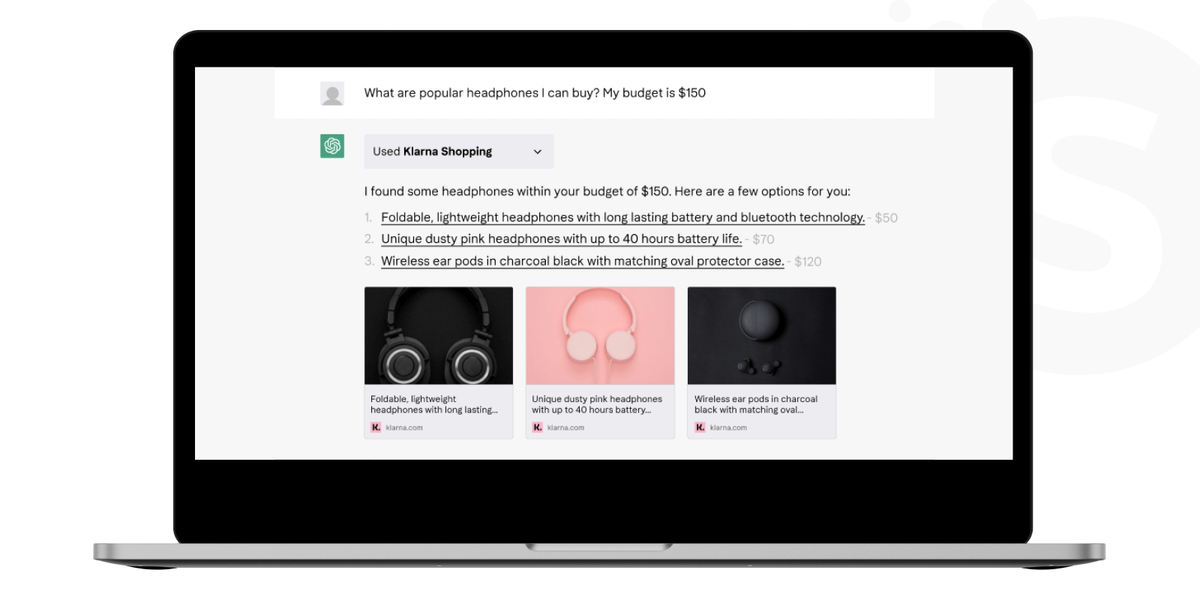
The plugin provides contextual responses to customer queries, helping online shoppers. Users can also navigate via generated links from the chat to the product page. This approach simplifies the path from product discovery to purchase.
Real Estate: Redfin
The Redfin ChatGPT plugin simplifies the real estate search process. It allows users to find homes and neighborhoods that fit their specific criteria. Beyond traditional Google and map-based searches, it uses machine learning models to recommend listings and estimate home values, offering a more insightful search experience. The plugin suggests homes that users might not have found through traditional search methods.
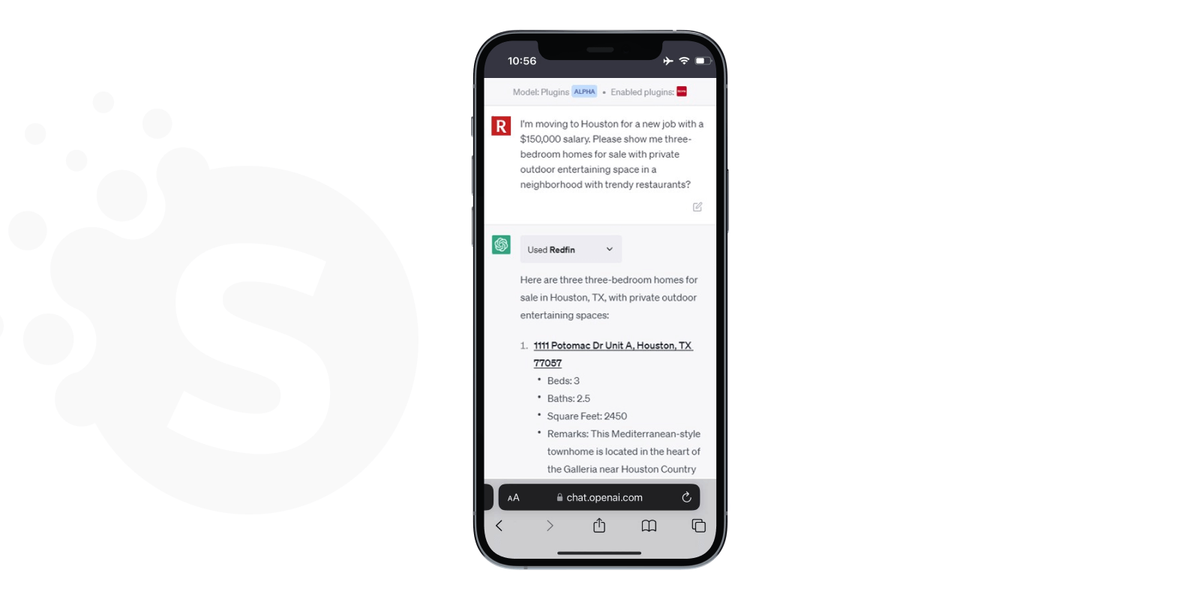
The Redfin plugin uses conversational AI to understand and meet user needs. A simple dialogue with the plugin makes home searching more manageable. Given the current scarcity of new listings, it helps buyers to find their dream house faster.
Data Science: Noteable
The Noteable ChatGPT plugin integrates natural language processing capabilities developed by OpenAI. Users can query data, carry out transformations, and detect patterns. NLP allows them to describe their goals and receive a custom notebook to fulfill them. Additionally, the plugin offers no-code data visualization, simplifying data interpretation.
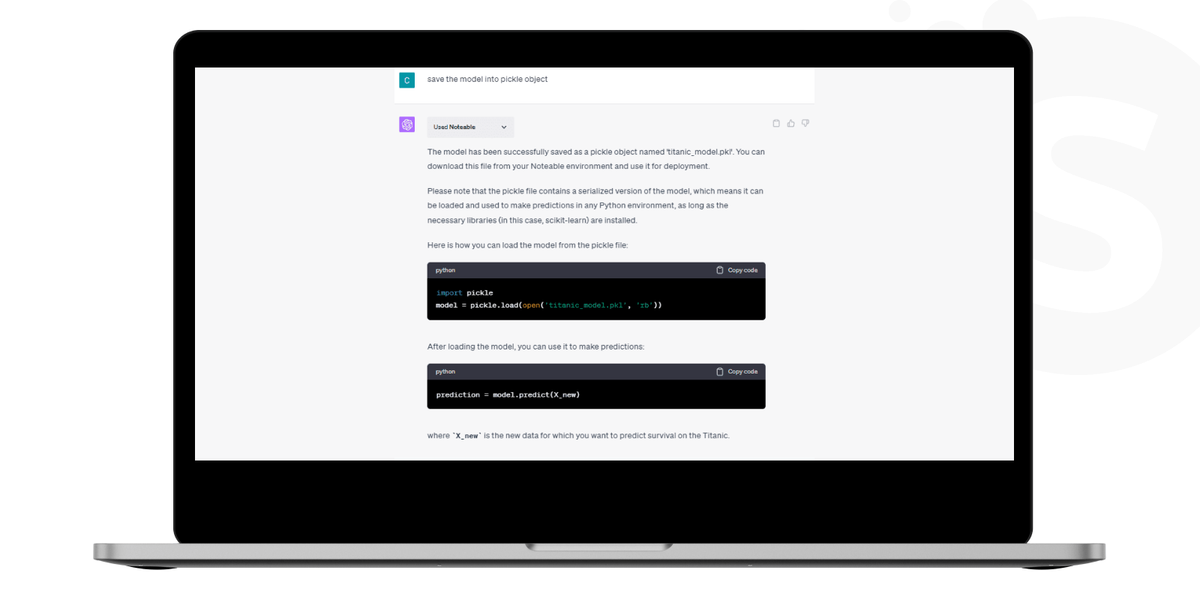
The plugin provides a shared workspace, enhancing team efficiency in data-driven projects. Teams can make data-informed decisions without the need for extensive technical expertise. It becomes an invaluable tool for anyone in data science, whether a novice or a seasoned professional.
Fintech: PortfolioPilot
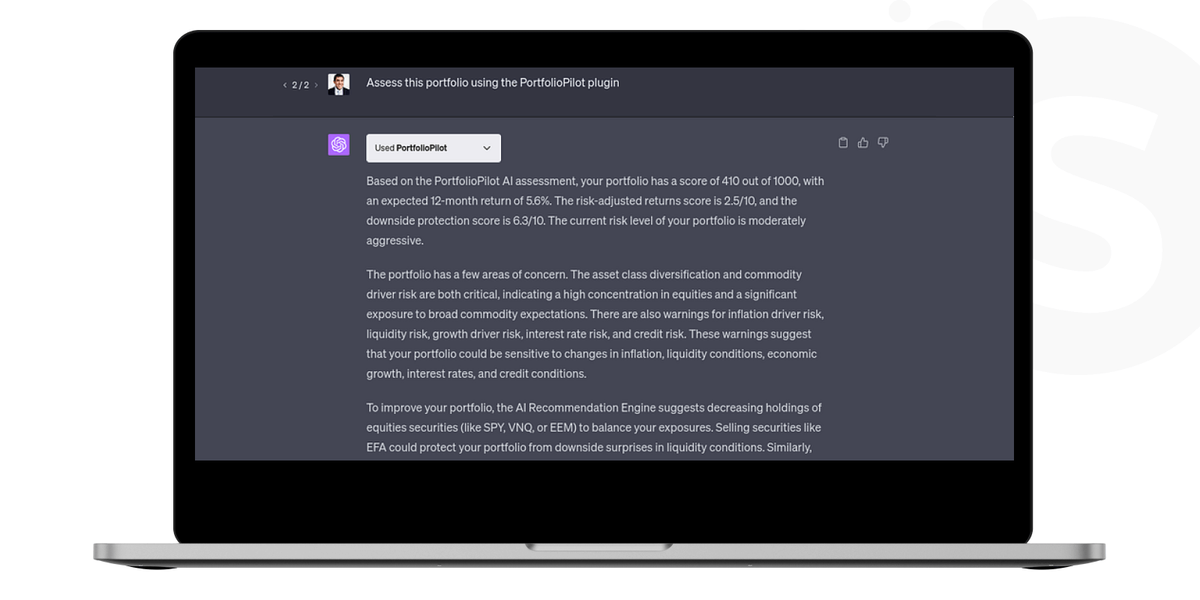
PortfolioPilot offers personalized investment recommendations and insights. It can provide real-time information on securities like stocks, ETFs, and cryptocurrencies. The plugin offers portfolio assessment, explaining expected returns, risk-adjusted metrics, and diversification insights. It also recommends improvements to a user's investment strategy based on their portfolio.
Conclusion
The ChatGPT platform constantly enhances its NLP capabilities and the supporting APIs for plugin development. These constant updates allow for the development of advanced plugins. Thus, users can experience more specialized functionalities across diverse sectors.
Plugins can use data analytics and behavioral insights to provide relevant interactions. Many sectors, such as healthcare, real estate, and fintech, continue to digitize. This trend drives the development of industry-specific plugins that offer solutions to meet specialized needs.
An experienced community of Softermii developers can help you create a groundbreaking tool. Contact us today and discover the endless opportunities ChatGPT plugin development can bring your business.
Creating a ChatGPT plugin enhances its functionality , tailoring it to meet particular requirements and uses
Frequently Asked Questions
How long does it take to build a ChatGPT plugin?
The time required to make a ChatGPT plugin depends on its complexity, features, and the developer's expertise. For example, a no-code CustomGPT tool allows users to create a plugin in minutes. For a more customized solution, consider hiring a developer or a dedicated team to create a ChatGPT plugin for your business. In such cases, a complex plugin with different functionalities might take several weeks or even months to develop.
Are there any costs involved in ChatGPT plugin development?
The development process varies depending on the specific case and may not have a fixed cost. For a precise quote, please reach out to us.
Other potential expenses to consider include:
What security considerations should be taken into account?
Implement secure data transmission protocols and consider data encryption. Regularly undergo security audits to identify and rectify vulnerabilities. Always stay compliant with privacy regulations pertinent to your plugin's target audience.
How do I keep my plugin updated?
Keeping your plugin updated involves more than fixing bugs. You need to keep up with changes to the ChatGPT API and incorporate new features. You also should often improve performance and security.
How about to rate this article?
5 ratings • Avg 4.8 / 5 · Thanks for rating!
Written by:

Co-Founder
Andrii Horiachko is a Co-Founder of Softermii with over 12 years of experience in software development, eight of them spent building and managing Softermii itself. He is responsible for technology-innovation in clients’ projects, making sure every product runs on a modern, carefully chosen tech stack that can sustai…