
When Should You Stop Paying for SaaS? A Build-vs-Buy Cost Model

Want to know more? — Subscribe
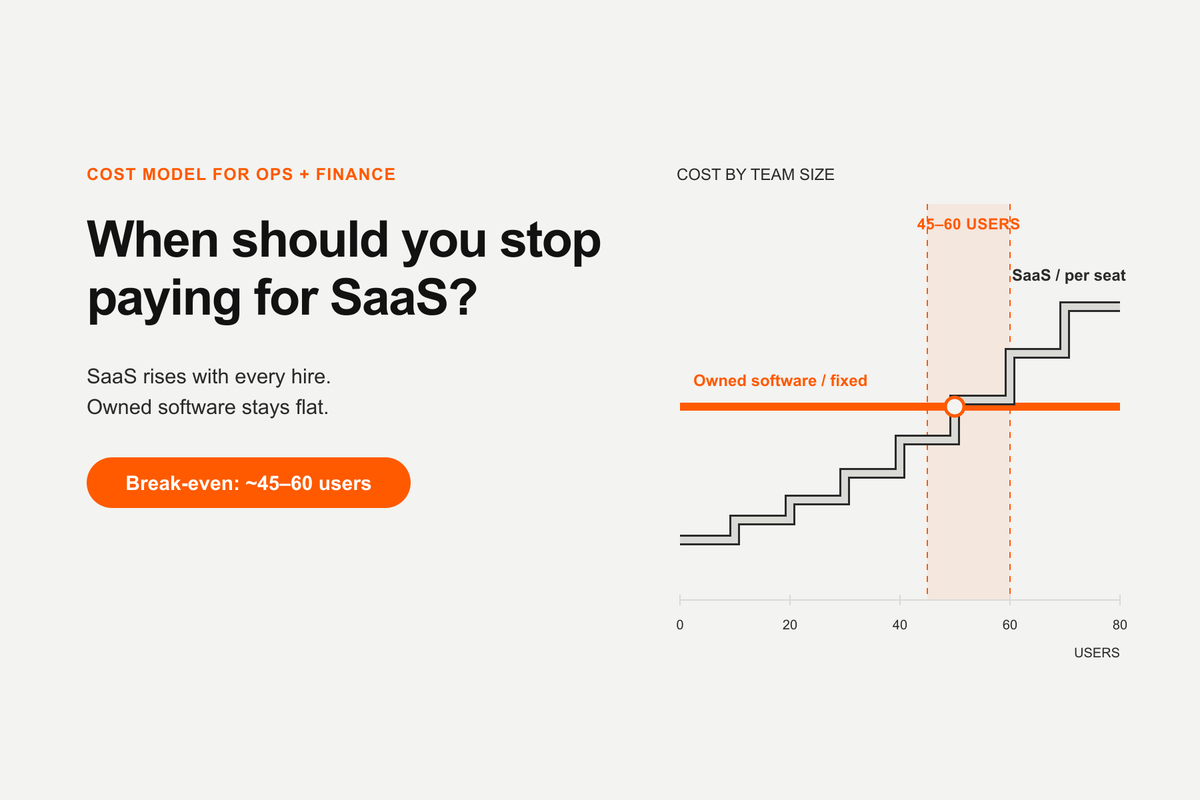
Subscription costs climb with every hire, while the cost of running software you own stays broadly flat. At $50 a seat with $2,000 a month for support, the crossover sits at roughly 45 to 60 users.
Every subscription looks cheap on the day you sign it. Fifty dollars per user per month is a rounding error next to payroll. The problem is that SaaS costs are not a purchase — they are an annuity you pay for as long as your business exists, and they scale with the thing you most want to grow: headcount.
At some point, most growing companies ask the obvious question: when does it make more sense to own the software instead of renting it?
This article answers that with arithmetic rather than instinct. It's a build-versus-buy model: we'll price a SaaS subscription over three years, price custom development using Softermii's APEX agentic AI engineering approach, add the total cost of ownership that most comparisons quietly omit, and calculate where the crossover actually sits.
The assumptions behind every number here
Transparency first. Four inputs drive the whole model:
- $50 per user per month. This is the base-case SaaS assumption used for the comparison — a mid-market seat price, not a universal SaaS market average. Your actual per-seat cost may be considerably higher or lower, and the model is sensitive to it.
- $40 per hour. A typical blended development rate, used throughout as an illustration.
- Up to 5× faster delivery. Softermii reports that its APEX agentic AI engineering approach can build up to five times faster than traditional software development.
- Ongoing support at $2,000 per month. A flat monthly support retainer, used here as a conservative illustration of ongoing ownership cost.
What SaaS actually costs you over three years
Start with the part that's easy to calculate.
Monthly SaaS cost = Number of users × $50
Annual SaaS cost = Number of users × $50 × 12
Three-year SaaS cost = Number of users × $50 × 36
| Users | Monthly cost | Annual cost | Three-year cost |
|---|---|---|---|
| 10 | $500 | $6,000 | $18,000 |
| 25 | $1,250 | $15,000 | $45,000 |
| 50 | $2,500 | $30,000 | $90,000 |
| 100 | $5,000 | $60,000 | $180,000 |
| 250 | $12,500 | $150,000 | $450,000 |
| 500 | $25,000 | $300,000 | $900,000 |
A 100-person company pays $180,000 over three years for one tool at one seat price. Most companies do not run one tool. Gartner puts worldwide software spending at $1.44 trillion in 2026, growing 15.1% — faster than the 13.5% it forecasts for IT spending as a whole. Software isn't just a large line item any more; it's the one expanding quickest, and per-seat pricing is a good part of the reason.
At company level, Cledara's March 2026 benchmark — built on 1.8 million purchases across 6,800 tools in 87 countries — puts the median company at 25 active SaaS subscriptions, with firms of 50–500 employees spending roughly $250–$350 per employee per month across the whole stack. Vertice tracks annual SaaS spend per employee at $9,324 in Q2 2026. One caveat on those last two, and on the Zylo figures below: all three companies sell SaaS management software, so they have a commercial interest in the conclusion that SaaS is expensive. Their transaction data is still the best available at this granularity — just read the framing knowing who wrote it.
The costs the pricing page doesn't show
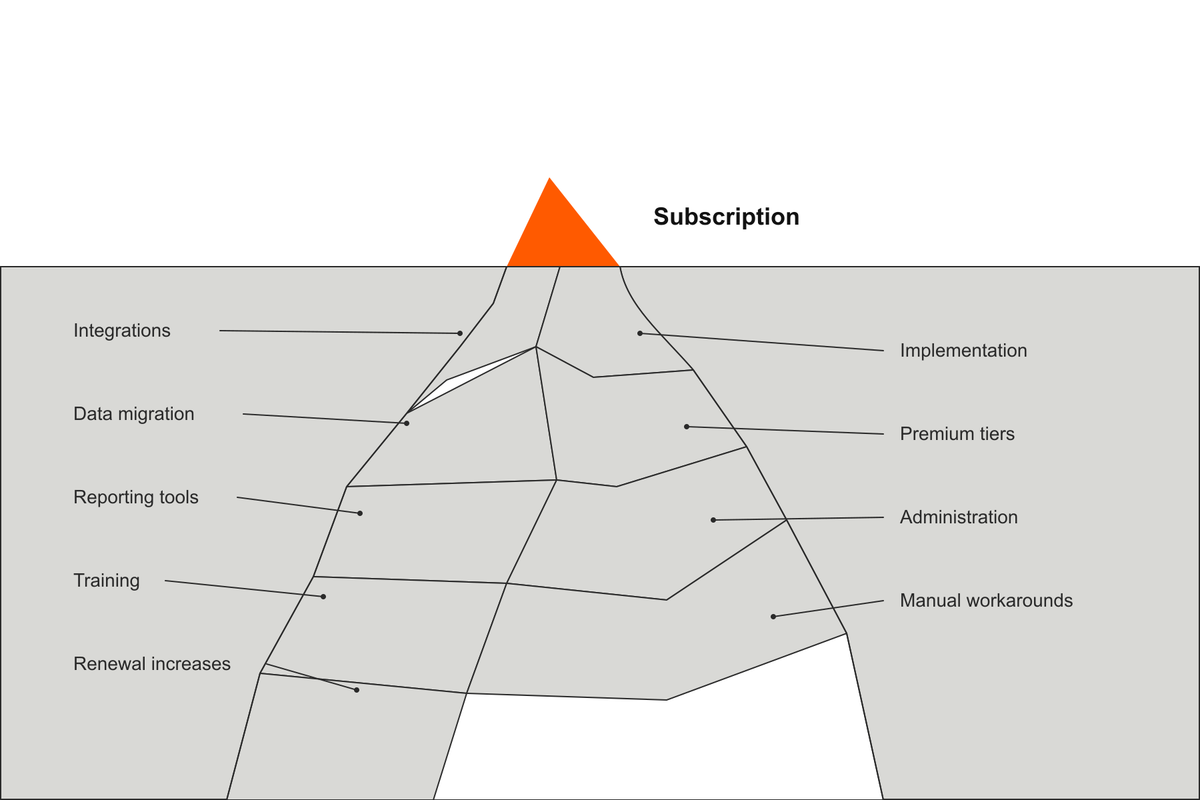
The table above covers the base subscription only. Depending on the vendor and your setup, a realistic budget may also need to absorb:
- Integrations — connectors, middleware, or API work to make the tool talk to your other systems
- Implementation and configuration — often a one-time professional-services fee
- Data migration — moving history in, and eventually out
- Premium modules and tiers — the feature you actually need sitting one plan above the one you bought
- External reporting tools — because native reporting rarely matches how you run the business
- Administration — someone's time spent on user management, permissions, and vendor relationships
- Training — onboarding new hires onto the tool, repeatedly
- Manual workarounds — the spreadsheets, copy-paste steps, and side processes that exist because the tool doesn't quite fit
- Subscription price increases — Zylo reports that 79% of IT leaders faced a price increase at renewal in the prior 12 months
- Switching costs — what it takes to leave, which is exactly why vendors can raise prices
We're deliberately not attaching dollar amounts to these; they vary too much to guess responsibly. But they are real, and leaving them out biases the comparison toward SaaS.
One more number worth sitting with: Zylo found organizations use just 54% of their SaaS licenses on average, and Vertice reports that 14% of applications go completely unused while 51% are underutilized. A meaningful share of that annuity buys nothing at all.
What custom development with Softermii APEX costs
Custom software inverts the cost shape. Most of the money lands up front, and what's left is a running cost that stays flat while your headcount climbs. Two labels recur from here on, including in the charts: Softermii APEX is the delivery approach that builds the system, and Softermii Custom is the resulting owned software whose total cost we're tracking.
The base formula:
Estimated build cost (illustrative) = Estimated engineering hours × $40 blended rate
To illustrate what the speed claim means in budget terms:
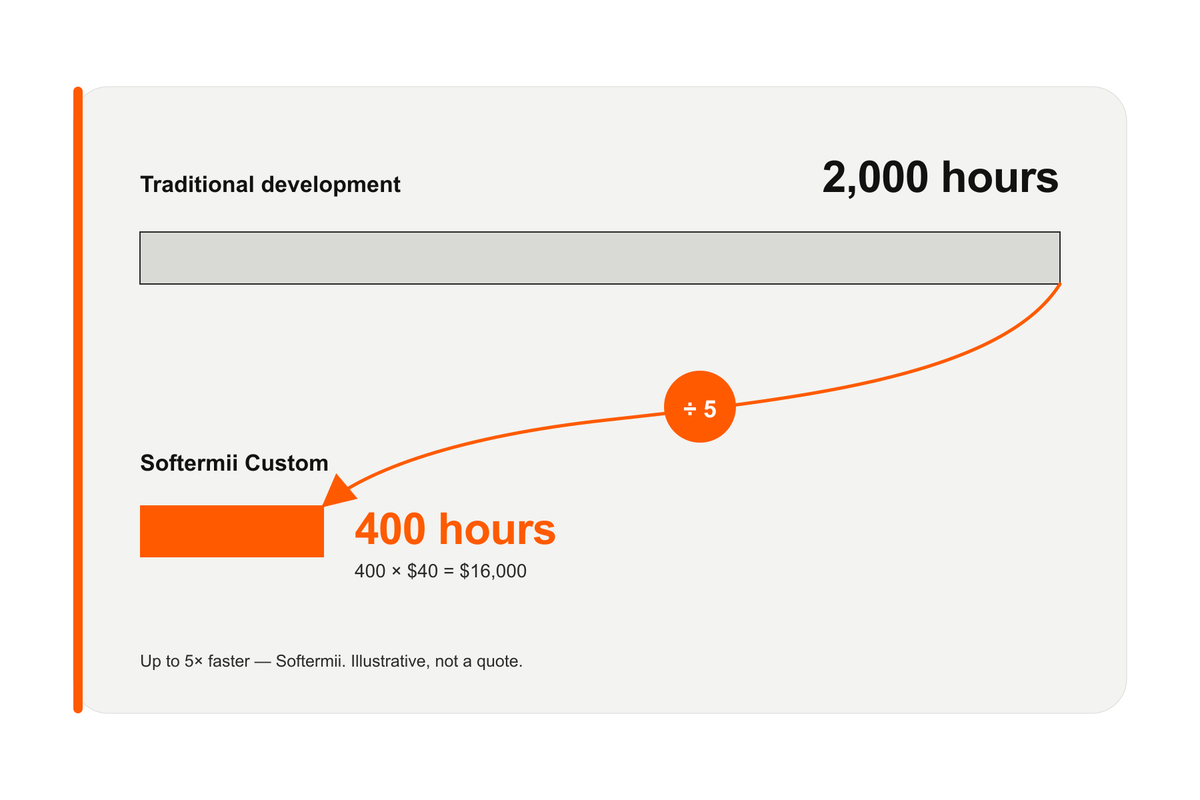
Build effort (illustrative) = Traditional development hours ÷ 5
Build cost (illustrative) = (Traditional development hours ÷ 5) × $40
Worked example. Suppose a project is estimated at 2,000 engineering hours under traditional delivery:
- Build effort: 2,000 ÷ 5 = 400 hours
- Build cost (illustrative): 400 × $40 = $16,000
Read that as a simplified scenario, not a quote. Two caveats matter a great deal.
First, "5× faster" describes delivery speed, and delivery speed does not always translate into a perfectly proportional reduction in billable hours. Some work compresses dramatically under agentic AI engineering — scaffolding, boilerplate, test generation, documentation, first-pass implementations. Other work does not compress at the same rate: stakeholder alignment, regulated-domain review, security hardening, third-party integration debugging, and change management all still run on human clock speed.
Second, actual speed and cost depend on scope, complexity, integrations, security requirements, compliance obligations, data readiness, and stakeholder availability. A project where requirements shift weekly and approvals take two weeks will not be delivered five times faster no matter what tooling is applied.
Keep hosting, security, third-party services and future enhancements out of the initial development estimate and budget them separately. If you want to see how those line items behave on a real project, our AI agent development cost breakdown runs the same arithmetic on a different kind of build. Support gets its own section below, because it's the number that decides most of these comparisons.
How to calculate the SaaS vs custom software break-even
Here's the calculation most finance leaders reach for first:
Subscription-only break-even (months) = Initial build cost ÷ Monthly SaaS subscription cost
Using the 100-user example:
- SaaS cost: 100 × $50 = $5,000 per month
- Build cost (illustrative): $16,000
- Subscription-only break-even: $16,000 ÷ $5,000 = 3.2 months
On paper, the build pays for itself in a quarter. The arithmetic is right, but it only answers one narrow question: how long until the build cost equals the subscription line item? Month four, and every month after it, sits outside the frame.
There's a second thing the formula quietly assumes: that the software already exists on day one. It doesn't. Through the build you carry the subscription and the development at the same time, so every break-even figure below should be read from go-live, not from kick-off. Softermii reports that 85% of APEX MVPs launch in under six weeks — that is the number to add before you take any of this to a board.
A responsible decision has to price both sides fully, over the same time horizon, for the same scope and functionality.
- On the Softermii Custom side: hosting, maintenance and support, future development, security and compliance work.
- On the SaaS side: implementation and integration fees, internal administration, data migration and switching costs, workflow inefficiency, and price increases at renewal.
- On both sides: residual or resale value where applicable, and the business value of owning the software and its intellectual property.
At what user count does building beat subscribing?
Everything above compares a recurring cost against a one-time cost, which is the trick that makes custom software look better than it is. Owned software has a run rate of its own, and until you price it the comparison isn't finished.
An ongoing support retainer covers that run rate. For the full scope and Softermii's actual fixed pricing, see the APEX page. A retainer like this typically includes 24/7/365 infrastructure monitoring and optimization, ongoing product development, performance tracking, code reviews, continuous QA, weekly or bi-weekly releases, and monthly product reviews. The flat $2,000 a month used here is a conservative illustration. Two things stay outside a support retainer like this: major architectural work, which is scoped and priced separately, and hosting and third-party services, which remain yours. The retainer is fixed against a scope rather than a seat count — it moves if what you're asking it to support changes, but it doesn't reprice every time you hire.
| Support period | Cost |
|---|---|
| Monthly | $2,000 |
| Annual | $24,000 |
| Three-year | $72,000 |
Now the break-even formula has a real number in it:
Adjusted break-even (months) = Initial build cost ÷ (Monthly SaaS cost − Monthly support cost)
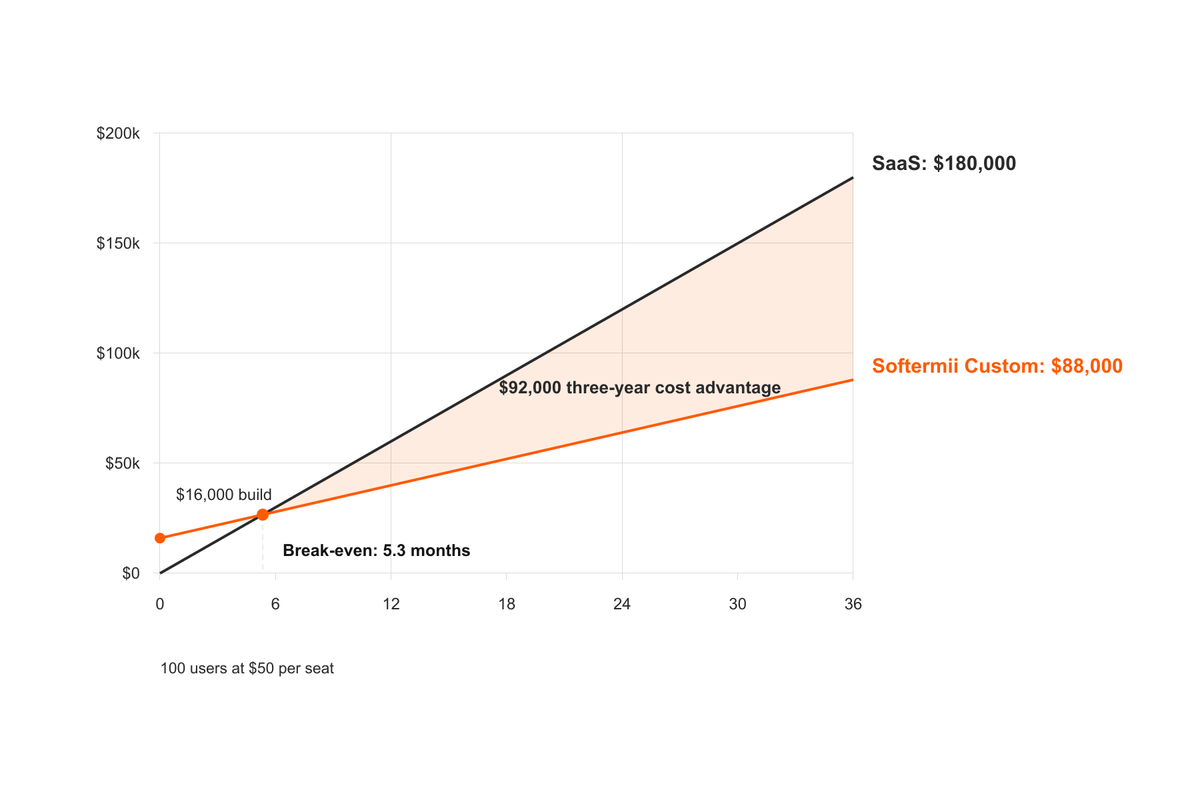
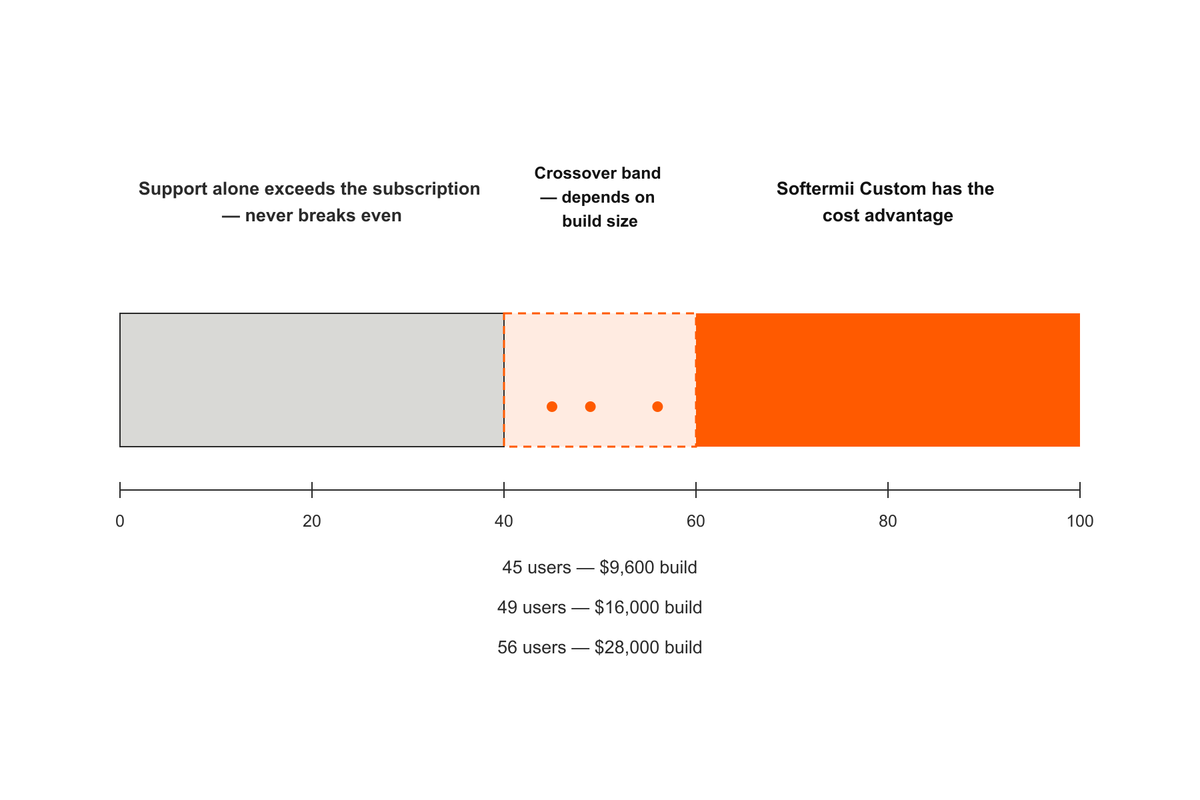
And it produces a threshold that matters more than any single scenario. At $50 per seat, support alone consumes your entire subscription until you reach 40 users. Under that headcount the retainer has already eaten the saving before a line of code exists, so the break-even simply never arrives, however modest the build.
Above it, the picture depends on build size:
| Illustrative build cost | Users needed for a 3-year payback | Users needed for a 2-year payback |
|---|---|---|
| $9,600 | ~45 | ~48 |
| $16,000 | ~49 | ~53 |
| $28,000 | ~56 | ~63 |
That clustering is the real finding. At $50 per seat, the crossover sits somewhere around 45 to 60 users across a wide range of project sizes — because support cost, not build cost, dominates the equation. Nearly tripling your build budget moves the threshold by roughly ten users. Doubling your seat price roughly halves it.
Those thresholds hold the seat price flat for three years, which almost certainly won't happen, and it's worth knowing which way that bias runs. Apply a modest 7% annual increase and the three-year SaaS cost at 100 users rises from $180,000 to about $193,000, while the payback thresholds above drop from 45, 49 and 56 users to roughly 42, 46 and 52. It doesn't rescue the smallest case — at 25 users SaaS still wins by around $33,000 — but every threshold in this article is the version that flatters the subscription.
Three scenarios: 25, 100 and 250 users
| A — Small team | B — Growing company | C — Integration-heavy business | |
|---|---|---|---|
| Users | 25 | 100 | 250 |
| SaaS monthly | $1,250 | $5,000 | $12,500 |
| SaaS annual | $15,000 | $60,000 | $150,000 |
| SaaS three-year | $45,000 | $180,000 | $450,000 |
| Traditional effort (est.) | 1,200 hours | 2,000 hours | 3,500 hours |
| Softermii APEX effort (÷5) | 240 hours | 400 hours | 700 hours |
| Softermii APEX cost (× $40) | $9,600 | $16,000 | $28,000 |
| Subscription-only break-even | 7.7 months | 3.2 months | 2.2 months |
| Break-even after support | Never | 5.3 months | 2.7 months |
| Three-year Softermii Custom total (build + support) | $81,600 | $88,000 | $100,000 |
| Three-year cost advantage | SaaS, by $36,600 | Softermii Custom, by $92,000 | Softermii Custom, by $350,000 |
| Not included either side | Hosting, third-party services, SaaS implementation, admin, training, price increases | Same, plus data migration, integration build-out, internal product ownership | Same, plus compliance review, multi-system integration maintenance, switching costs from incumbent tools |
| Likely recommendation | Stay on SaaS | Softermii Custom is worth serious evaluation | Softermii Custom deserves strong consideration |
| Key reason | At 25 users the subscription doesn't even cover the support retainer. A team this size also rarely has capacity to own a product roadmap, and off-the-shelf workflow fit is usually adequate. | Payback inside six months and a $92,000 three-year cost advantage make the case real — but the decision should turn on fit. If the tool matches how you work, the saving may not justify the operational change. | Three-year subscription cost is 4.5× the all-in Softermii Custom total — a decisive cost advantage. The deeper driver is fit: heavy integrations, non-standard workflows and compliance needs are where generic SaaS forces expensive workarounds. Owning the system and its data becomes a strategic asset. |
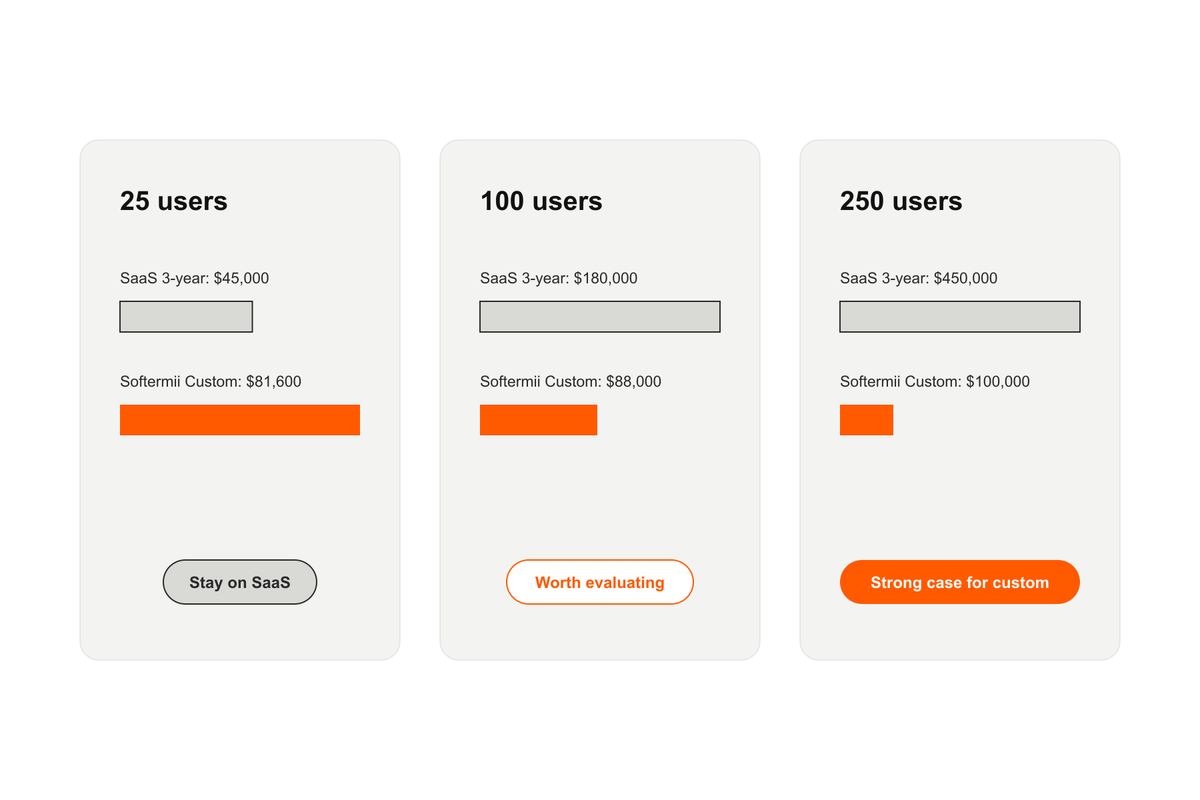
Notice what changes across the three columns. The money moves, obviously. The more decisive variable is whether the standard product still matches how the business actually runs.
Six signs your SaaS subscription has outgrown its value
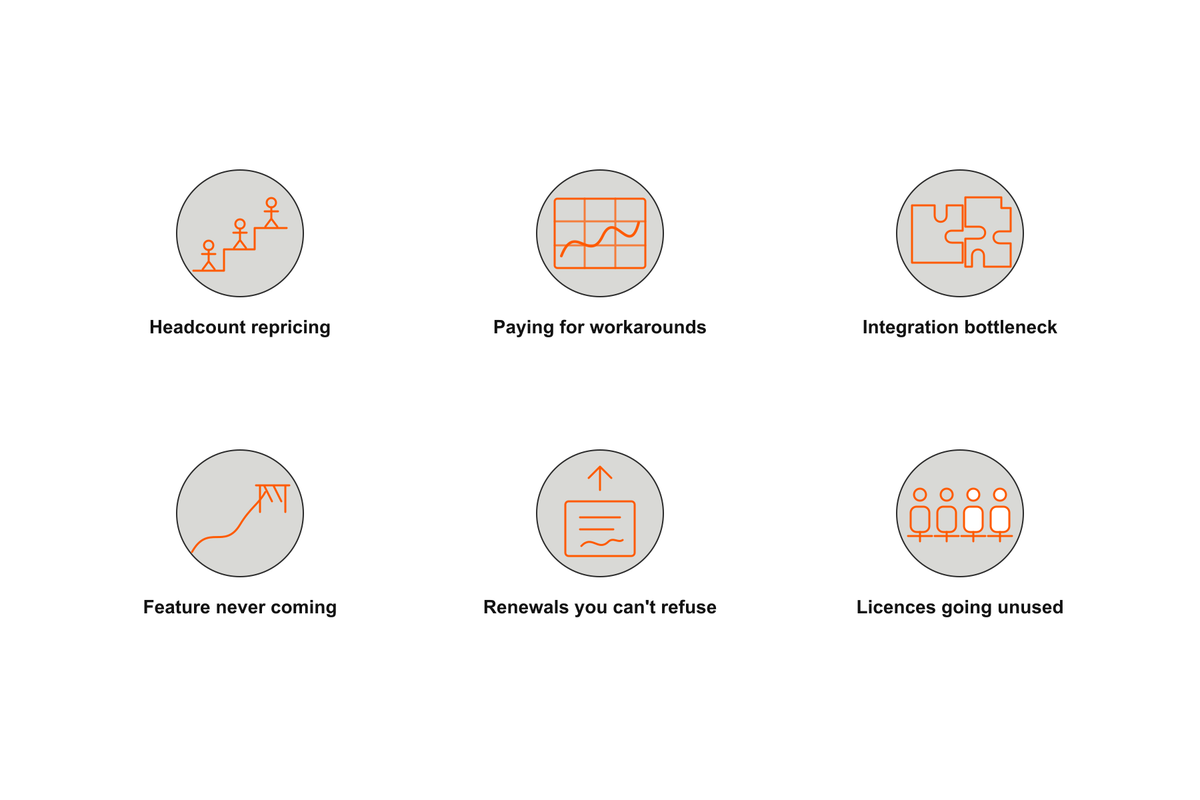
Cost triggers the question. Fit answers it. Consider a serious evaluation when several of these are true at once:
- Headcount growth is repricing the tool. Your subscription grows linearly with hiring while the value it delivers doesn't.
- You're paying for workarounds. Spreadsheets, manual re-keying and side processes exist to bridge gaps the tool leaves. Those hours are a real cost, and they compound.
- Integration is the bottleneck. You're paying middleware fees, or engineering time, to make tools that should cooperate actually cooperate.
- You need a feature the vendor will never build. Your differentiating process is the thing the standard product handles worst.
- Renewal is a negotiation you keep losing. Price increases you can't refuse are a symptom of switching costs you never priced.
- You're paying for capacity you don't use. If half your licenses are dormant, fix that first — it may resolve the problem entirely and cost nothing.
Equally, there are strong reasons to stay: the tool genuinely fits, the category is commoditized (payroll, email, accounting), the vendor's compliance certifications would be expensive to replicate, or your team has no capacity to own a product. Custom software does not always deliver a lower total cost of ownership (TCO), and building something you'd rather rent is an expensive way to prove it. Worth remembering that most of the ways these projects go wrong have nothing to do with the cost model.
How to run a build-versus-buy comparison fairly
It's easy to build a spreadsheet that makes either option win. The discipline is holding both sides to the same horizon, the same scope and the same cost categories.
How to run a SaaS versus custom software comparison in five steps
Fix a three-year horizon
Price both options over the same 36 months. Shorter windows flatter custom software because the build cost hasn't been earned back yet; longer ones flatter whichever side has the lower run rate. Pick the horizon before you see the numbers.
Count every SaaS line item, not just the seat price
Add implementation and configuration fees, integration work, data migration, premium tiers, internal administration time, repeated training, and the renewal increase you should expect. Then subtract nothing — dormant licenses still cost money.
Get a scoped development estimate, not a ballpark
Ask for engineering hours against a written scope, then multiply by the blended rate. If the resulting payback is under roughly six months, treat the estimate as the main risk rather than the subscription — the build could cost double and still "pay back" quickly.
Add the ownership run rate before dividing
Hosting, third-party services and a support retainer are ongoing costs of owning software. Subtract the monthly support cost from the monthly SaaS cost first, then divide the build cost by what's left. If support meets or exceeds the subscription, break-even never arrives.
Weigh workflow fit, not cost alone
Count the payroll hours lost to spreadsheets and manual re-keying, and put a value on owning the system and its data. If the standard tool genuinely fits how you operate, a modest three-year saving may not justify the operational change.
Then treat the output as a decision aid. A 5.3-month payback earns the idea a serious conversation and a properly scoped estimate; it doesn't earn you a kick-off date. Before you commit, agree how you'll measure the return once it's live.
The bottom line
At $50 per user per month, the crossover sits at roughly 45 to 60 users for most project sizes. Below it, the economics favor SaaS and the arithmetic isn't close — a 25-person team would spend $81,600 over three years to own what it could rent for $45,000. Above it, the gap opens fast: at 250 users, three-year subscription costs of $450,000 against an all-in custom-build total of $100,000 are hard to dismiss.
Two structural points matter more than any single number. Support cost is flat; subscription cost is not. The $2,000 monthly retainer is fixed against a scope, not a headcount, so it doesn't climb every time you hire and there's no annual uplift letter attached to it. And build cost matters less than you'd think — because ongoing cost dominates, tripling your project scope shifts the crossover by about ten users.
One more thing worth saying plainly: almost every cost this model leaves out sits on the SaaS side of the ledger. Implementation fees, integration work, data migration, administration time, repeated training and renewal increases are all real, and all excluded. The crossover points here are the conservative case, not the optimistic one.
Softermii's APEX approach changes this calculation by compressing the initial development effort that historically put custom software out of reach for mid-sized companies. What it doesn't do is remove the ongoing cost of ownership or guarantee the outcome of any particular project. Actual results depend on scope, complexity, integrations, and compliance requirements.
Run the numbers with your real seat count, your real subscription price, and a properly scoped estimate. Then go and look at how your team actually works, because that is the part the spreadsheet can't tell you.
Frequently Asked Questions
At what point does custom software become more cost-effective than SaaS?
How do you calculate the break-even point between SaaS and custom software?
Does 5× faster delivery mean 80% lower cost?
What costs do SaaS pricing pages leave out?
Is it cheaper to build or buy software?
- #SaaS
- #Custom Software
- #Cost Model
- #Total Cost of Ownership
- #APEX
- #Build vs Buy
How about to rate this article?
2 ratings • Avg 5 / 5 · Thanks for rating!
Written by:

Chief Operating Officer
Maksym is one of the few operations leaders who has personally done nearly every job he now oversees. Across 15+ years he rose through the full stack of software delivery — QA → Business Analysis → Product → COO — building QA, BA, Design, and engineering functions from scratch at Netcracker Technology (including rol…