
How to Reduce AWS Costs: Proven Strategies and Best Practices

Want to know more? — Subscribe
AWS cost optimization is about maximizing the ROI in the cloud. The company offers over 200 fully-featured services from data centers globally, often on a…
AWS cost optimization is about maximizing the ROI in the cloud. The company offers over 200 fully-featured services from data centers globally, often on a pay-as-you-go basis.
Yet, this model can lead to variable costs based on usage, resource selection, and management strategies. Without proper oversight, AWS bills can be higher than anticipated. This factor can further affect the financial planning and operational efficiency of organizations.
In this article, the Softermii team explores AWS cost structure, cost reduction strategies, and optimization practices, offering insights on monitoring and managing AWS costs. Businesses scale and evolve, making their Amazon environments more challenging to manage. Efficient cost optimization ensures that you're only paying for the resources you need and using them most effectively.
Want a skimmable version?
Get a quick overview of our article with AI to access all the important information quickly.
Generate AI SummaryHide summary
Want a skimmable version?
Get a quick overview of our article with AI to access all the important information quickly.
Generate AI SummaryHide summaryProven strategies to reduce AWS costs — the cost structure, hidden costs, and optimization best practices.
AWS Cost Structure
AWS operates primarily on a pay-as-you-go model, allowing flexibility and scalability for its users. Users can pay only for individual services without any long-term contracts or complex licensing.
However, within this overarching approach, AWS offers a variety of pricing models for its over 200 cloud services. The cost ceases once the service is no longer used. This strategy benefits businesses aiming to optimize costs according to their changing needs. Let's now explore these pricing models and how they cater to different user needs:
- Free Tier. AWS allows users to sample a range of products for free, subject to certain limitations.
- On-Demand. This model charges users by the second or hour without any upfront payment. It's suitable for unpredictable workloads but is usually the most expensive option.
- Spot Instances. This model offers discounts of up to 90%, allowing users to bid for unused AWS capacity at reduced rates. However, these instances can be terminated on short notice.
- Reserved Instances. Users commit to using resources for a long duration (1-3 years) in exchange for discounts. There are Standard and Convertible options, each with different flexibility and cost implications.
- Saving Plans offer discounts for committing to a certain level of AWS resource usage over one to three years.
- Dedicated Hosts. This involves renting a physical server within the AWS data center, typically more expensive and suited for enterprises.
Project Calculator
Get the detailed project estatimation – choose the details of your product and calculate the quote of the development
Calculate nowHidden Costs in AWS
AWS's transparent pricing calculator allows you to estimate the costs of your services. Yet, some hidden costs may occur if not carefully monitored. Identifying and understanding these hidden costs will allow you to avoid budget overruns.
- Data Transfer Fees. Transferring data into AWS is usually free, but transferring out can incur significant costs.
- Underutilized Reserved Instances. While Reserved Instances can save money, they can also be a money trap if your usage is less than anticipated.
- S3 API Requests Charges. Amazon charges for requests to the S3 service, including actions like listing, deleting, or accessing objects.
- Incomplete Multipart Uploads. Charges for storing parts of an object that have not been fully uploaded.
- EBS Snapshot Storage Fees. Charges for storing snapshots of EC2 instances.
- Unattached EBS Volumes. Charges for EBS volumes that remain after EC2 instances are terminated.
- Elastic IP Address Fees. Fees for unused allocated Elastic IP addresses.
- ELB Data Processing Fees. Charges for data processed by the Elastic Load Balancer.
- ElastiCache Node Cache Storage Fees. Charges for storage used by cache nodes and snapshots in ElastiCache.
- Amazon SES Sending Limits and Additional Fees. Charges for exceeding sending limits and for features not included in the basic SES service.
Analyzing Your Current AWS Usage and Costs
Regularly monitoring and analyzing your AWS usage is crucial for cost optimization. AWS Cost Explorer and AWS Budgets provide insights into your spending patterns. These tools can help identify underutilized resources.
By analyzing your current usage, you can pinpoint areas where to reduce AWS costs, such as:
- downsizing instances;
- deleting unused volumes;
- selecting more cost-effective regions.
Businesses should consider implementing tagging strategies to track costs by department or project.
AWS Cost Reduction Strategies
Businesses don't want to compromise service performance and reliability. They also aim to get the best value for their money. Our DevOps team offers ways to reduce AWS costs while achieving an optimized cloud infrastructure.
Rightsizing Your Resources
Companies should analyze and scale their current resource utilization to match their usage. Review and adjust the instances, databases, storage size, and capacity regularly. AWS CloudWatch and Cost Explorer can monitor usage patterns and identify opportunities for rightsizing.
Choosing the Right Pricing Model
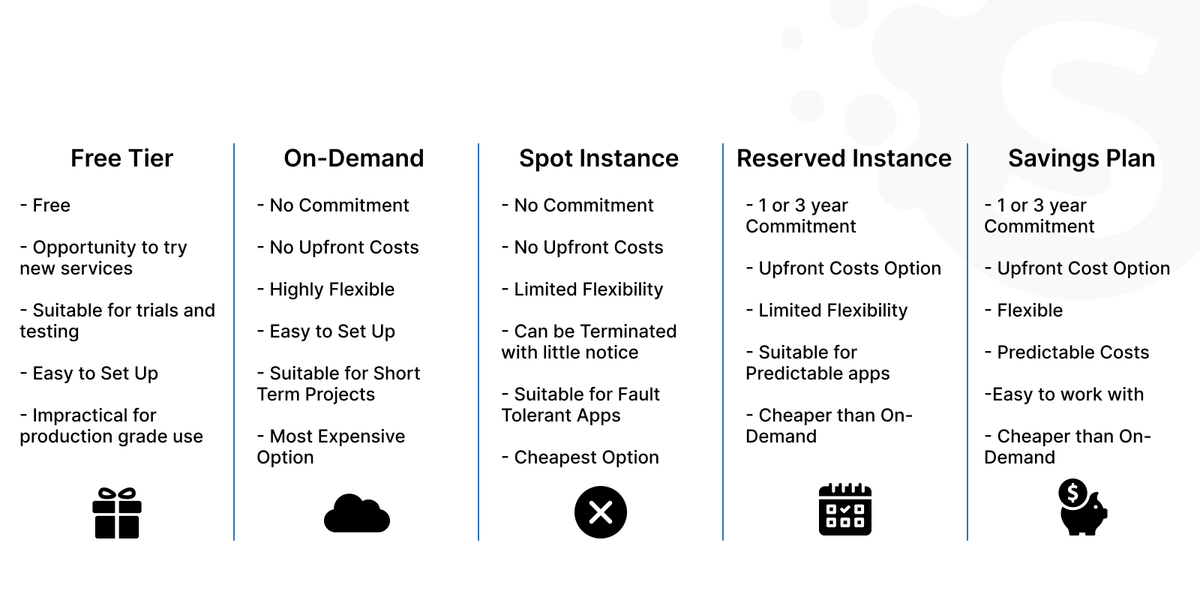
Understanding your workload patterns to select the right pricing model is crucial in optimizing costs:
- On-demand pricing is flexible but can be more expensive. It's perfect for short-term and irregular workloads.
- Reserved Instances and Savings Plans provide lower rates in exchange for a commitment to a consistent usage level over time. They are more suitable for predictable and steady workloads.
Leveraging Auto-Scaling to Optimize Costs
AWS Auto-Scaling adjusts the number of active instances in response to workload demands:
- During off-peak times, fewer resources are in use, reducing costs.
- During peak times, Auto-Scaling ensures performance by increasing capacity.
This adjustment helps maintain the balance between performance and cost. It ensures businesses can only pay for what they need and when needed.
Employing Budgeting and Cost Allocation Tools
AWS Budgets and cost allocation tags enable detailed tracking and management of cloud spending. With AWS Budgets, companies can set custom budget limits. Thus, they receive alerts when costs or usage exceed predefined thresholds.
Cost allocation tags categorize and track costs more granularly (by department, project, or environment). These tools provide visibility into organization spending. This way, they help identify areas where costs can be reduced or better allocated.
Utilizing AWS Trusted Advisor for Cost Optimization
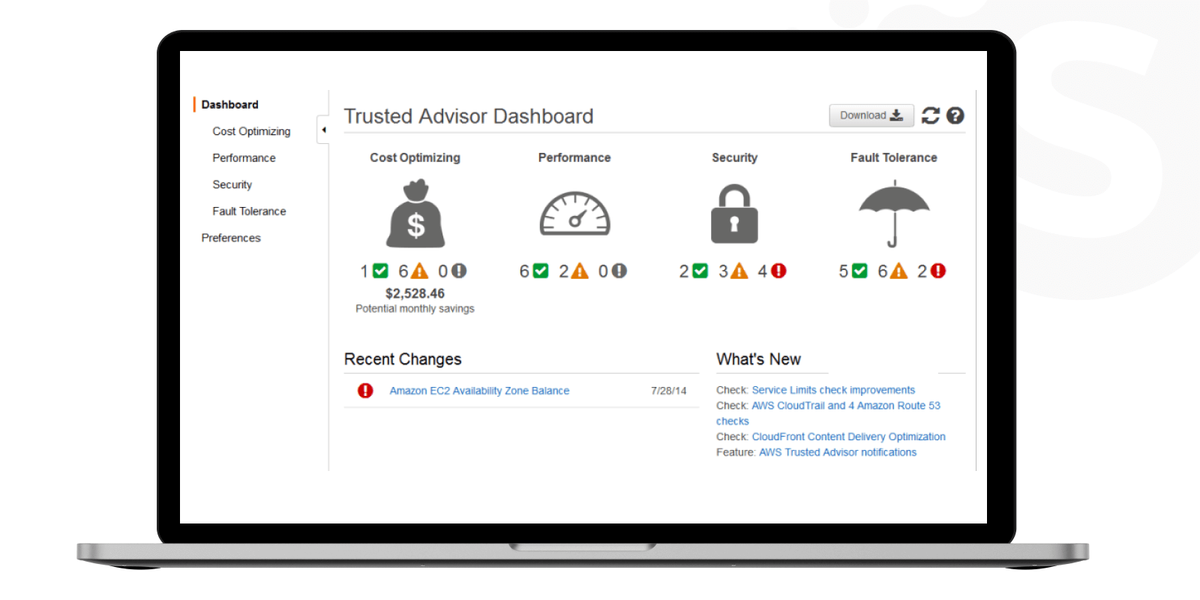
This service analyzes your AWS infrastructure and offers insights into where you can save costs. It can identify underutilized EC2 instances, suggest cheaper alternatives, or highlight idle resources. Trusted Advisor is a valuable tool for monitoring and improving the cost-efficiency of AWS services.
AWS Cost Optimization Best Practices
Amazon offers numerous features that, when used effectively, can substantially reduce expenses. To achieve these savings and enhance resource efficiency, here are some techniques that companies should implement.
Implementing Effective Tagging Strategies for Cost Management
Effective tagging is a foundational practice in AWS cost management. Tags are simple labels containing key-value pairs attached to the services. They allow users to create a dynamic, navigable map of their resources. It can reflect cost allocation, resource management, and operational strategy.
Cost Allocation and Budgeting. Tags can categorize resources by department, project, or environment (e.g., production, staging). This strategy provides a detailed breakdown of costs, enabling precise tracking and predictive budgeting. Also, with AWS Cost Explorer, companies can identify trends and forecast future costs.
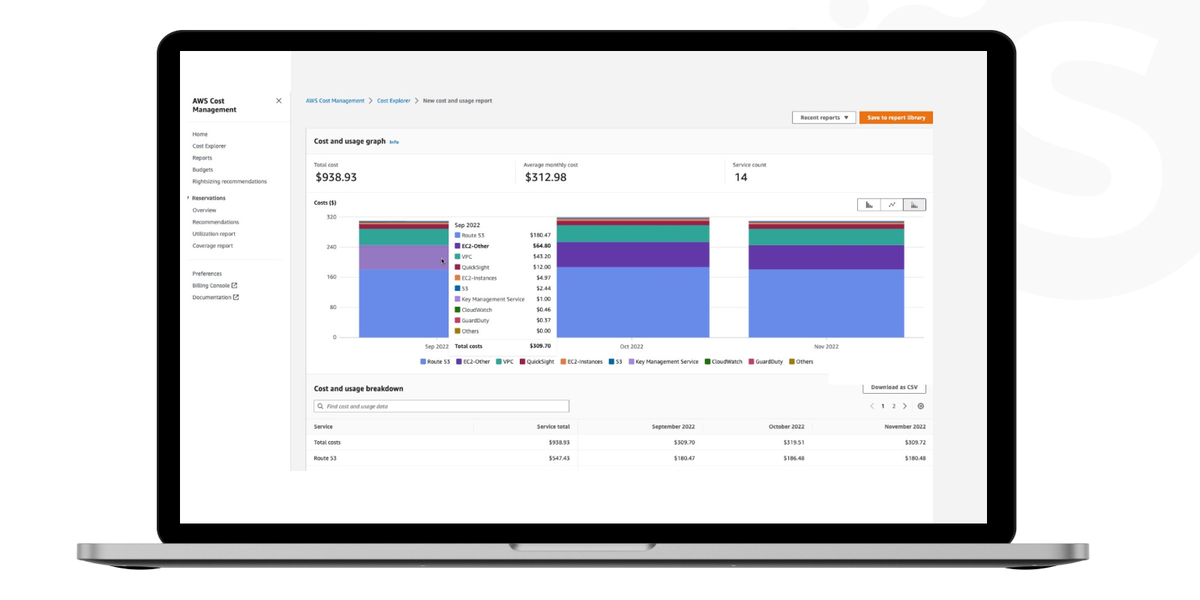
Resource Management. With proper tagging, identifying underutilized or orphaned resources becomes straightforward. For instance, users can schedule the deletion of non-critical resources after hours or during low-usage periods. This way, it enables timely decommissioning and saving costs.
The tagging strategy should align with the business's performance metrics and usage patterns. This alignment aids in rightsizing efforts, ensuring companies only pay for what they need.
Cost Recovery. Detailed tagging enables the generation of precise chargeback reports. It ensures accurate billing for each department or client based on resource usage. Additionally, it aids in tracking compliance with budgetary and regulatory requirements, highlighting deviations.
Automation and Governance. AWS Service Control Policies help ensure all resources are tagged upon creation. Businesses should automate resource lifecycle policies based on tags. It allows them to ensure that services are efficiently utilized throughout their lifecycle.
Data Transfer and Network Optimization
Data transfer and network usage also have a significant impact on AWS costs. It's crucial to understand AWS's data transfer pricing model and strategically architect applications and data flow to optimize these aspects, aligning with the modernization of data architecture.
Data Transfer Costs. When working with AWS, it's vital to familiarize yourself with its pricing model for data transfer. For instance, intra-region or inbound data transfer is typically free. Yet, AWS charges for data transfer "out" from AWS services to the internet or other regions. Analyze traffic patterns within the network to identify opportunities to reduce inter-region data transfers.
Content Delivery Network (CDN). Using Amazon CloudFront can reduce AWS costs by caching data at edge locations closer to users. It reduces the need for data to travel from the source, speeding up delivery. It can also optimize the delivery of frequently changing content, ensuring efficient data transfer.
Optimizing Data Flow. Organizations should remember to architect applications while minimizing cross-region or internet data transfers. VPC Endpoints and AWS Direct Connect enable private network connections that bypass the internet.
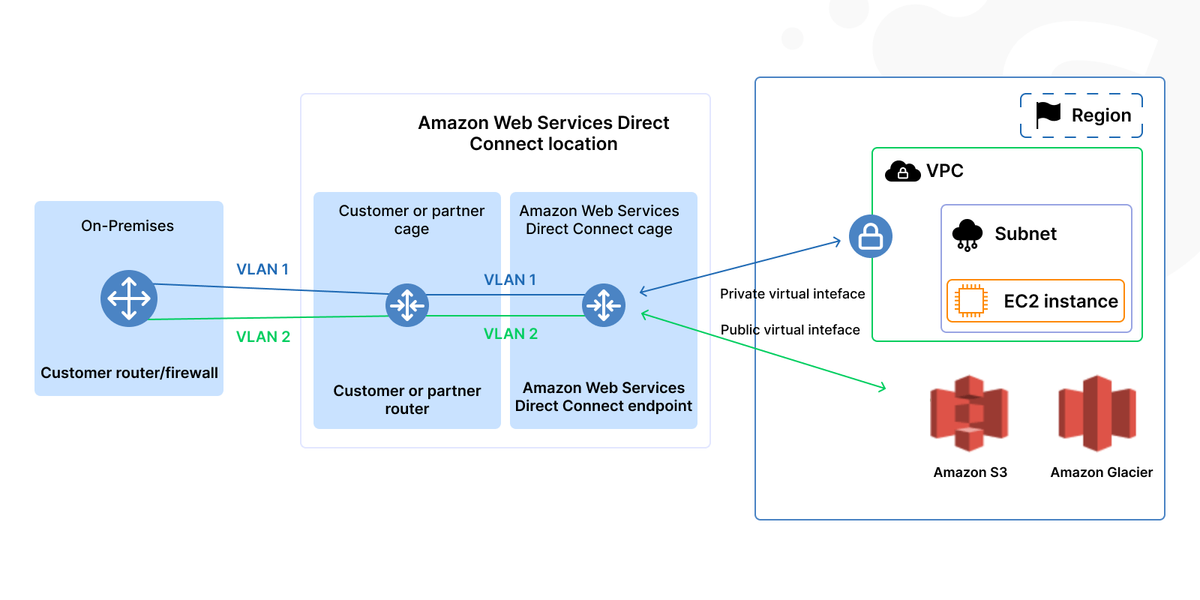
Rightsizing Bandwidth. Monitor and adjust bandwidth provisions according to actual needs. You should avoid over-provisioning while ensuring performance isn't compromised. Regular performance metrics reviews ensure the network is optimized for cost and performance. This approach allows companies to adjust strategies as needed.
Utilizing Amazon EC2 Spot Instances for Cost Efficiency
Spot Instances offer a powerful way to optimize costs on AWS for flexible and interruption-tolerant applications. It could be batch processing, data analysis, and background tasks. Spot Instances allow you to use unused EC2 capacity at significant discounts. For containerized workloads, consider leveraging services like AWS Fargate for even more efficient resource utilization and cost savings.
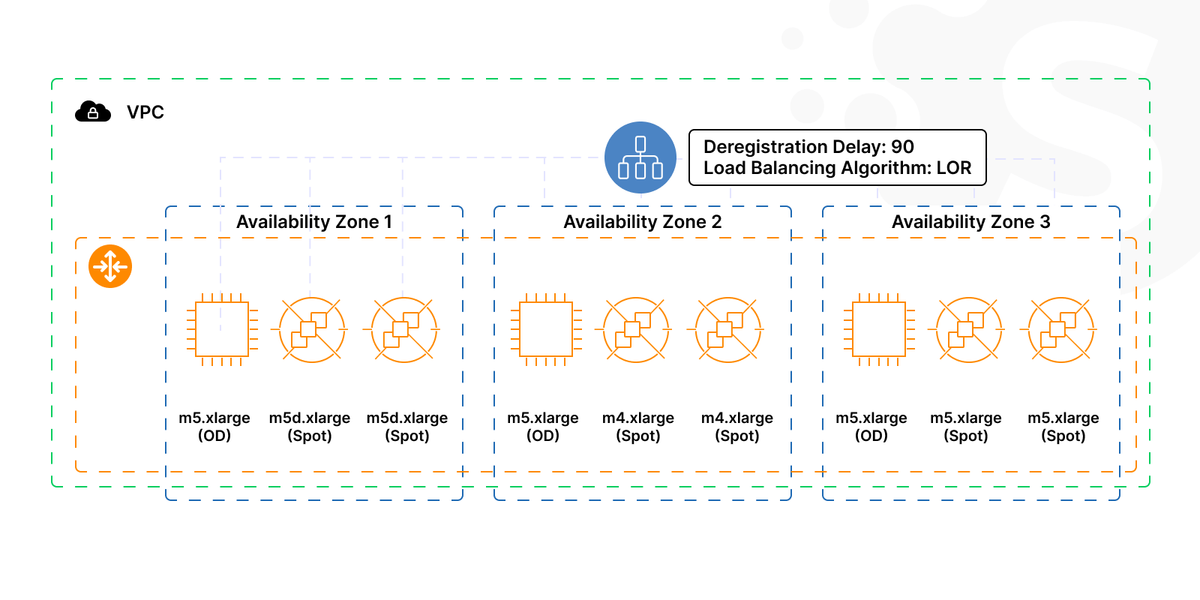
Continuous Integration/Continuous Deployment Pipelines. Companies prefer Spot Instances for resource-intensive build and test tasks. Their cost-effectiveness and scalability make them ideal for this sporadic and intensive workload.
High-Performance Computing. Spot Instances can drastically reduce costs for scientific modeling or any compute-intensive task.
Spot Instance Pools. Spread your workload across different Spot Instance pools, combinations of instance types, and Availability Zones. It allows you to minimize the impact of individual spot interruptions.
Integrated Spot Management Tools. AWS Batch or Elastic Kubernetes Service (EKS) can natively manage Spot Instances. These tools can handle the acquisition and replacement seamlessly.
Storage Optimization: S3 and EBS Cost-Saving Techniques
Effective storage management is critical for cost savings on AWS. Amazon S3 and Elastic Block Store offer features to reduce data storage costs based on usage patterns and requirements.
Amazon S3
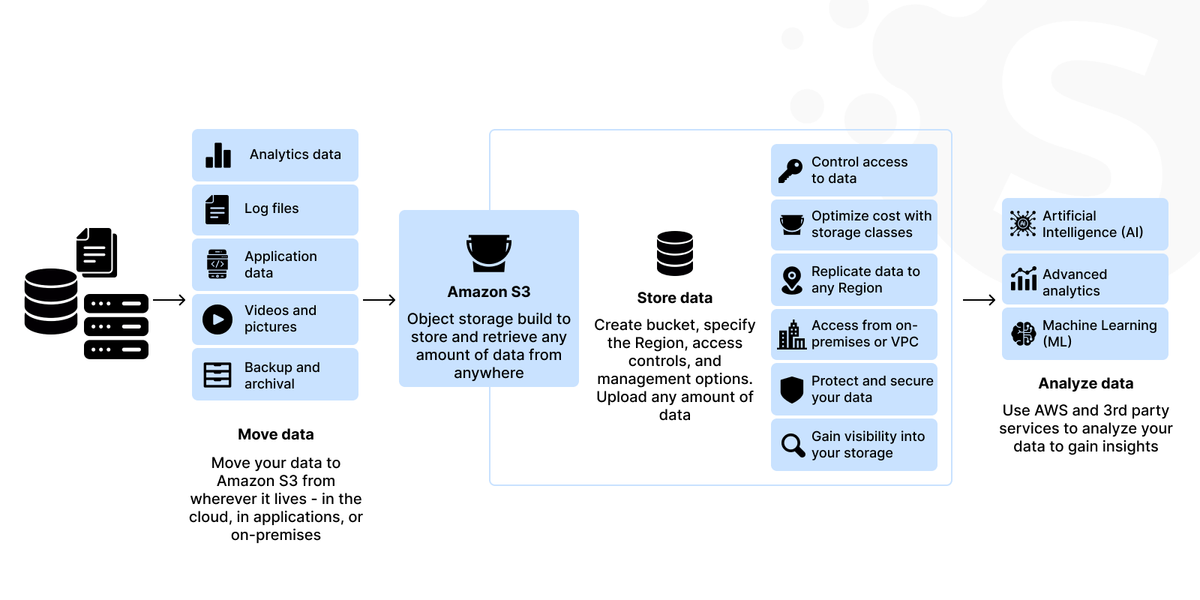
Companies might not always predict how frequently certain data will be needed. And sometimes, they can have data with unknown or changing access patterns. In this case, S3 Intelligent Tiering automatically moves data to a cost-effective access tier without operational overhead or performance impact.
For shared datasets, the Requester Pays feature can shift the cost of data retrieval to the user who requests the data, reducing your costs. S3 Storage Class Analysis helps analyze access patterns and determine when to transition data to a more cost-effective storage class.
Amazon EBS
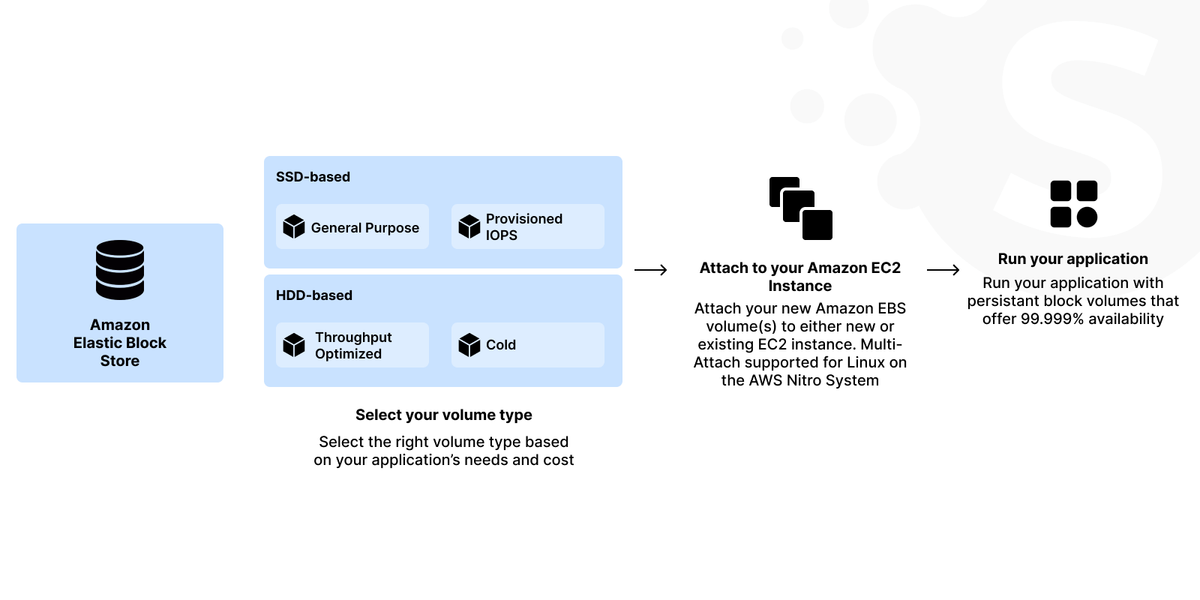
It's crucial to understand the characteristics of each EBS volume type and adjust them to your needs. This way, you can avoid paying for underutilized resources. For instance, st1 or sc1 volumes are much cheaper and perfectly suited for sequential access workloads like logging or data warehousing.
Implementing a progressive snapshot and deletion strategy reduces the storage footprint and costs. It keeps only the necessary snapshots and removes outdated ones.
Database Optimization: RDS and DynamoDB Strategies
Optimizing your database can significantly reduce AWS costs while maintaining performance and scalability. Databases often represent a significant portion of cloud spend. Optimizing RDS and DynamoDB can yield substantial savings. At the same time, they will maintain the required performance and availability for your applications.
Amazon RDS
Consider burstable instance classes for workloads with variable database performance requirements (db.t2 or db.t3). They can offer a baseline performance level that can increase performance as needed.
Use Amazon RDS Performance Insights to analyze and fine-tune your database performance. They may allow for smaller and less expensive instance types without sacrificing performance.
Amazon DynamoDB
DAX can reduce the read load on DynamoDB tables. It allows for lower provisioned read capacity and costs for read-intensive applications.
TTL can automatically expire and delete items that are no longer relevant. This way, it reduces storage and read/write throughput needs.
DynamoDB Auto Scaling can automatically adjust capacity to maintain performance and reduce costs for AWS.
AWS's transparent pricing calculator allows you to estimate the costs of your services. Yet, some hidden costs may occur if not carefully monitored.
Monitoring and Managing AWS Costs
The cost management process in AWS ensures two important things:
- You're always aware of how resources are being utilized.
- You know how to optimize and reduce AWS costs without affecting performance.
Several strategies can give you the necessary knowledge and tools to manage the costs. They ensure that your AWS spending remains controlled while meeting operational needs and objectives.
Setting Up and Managing AWS Budget Alerts
AWS Budgets allows companies to set precise budgets to track their cost and usage from the simplest to the most complex criteria.
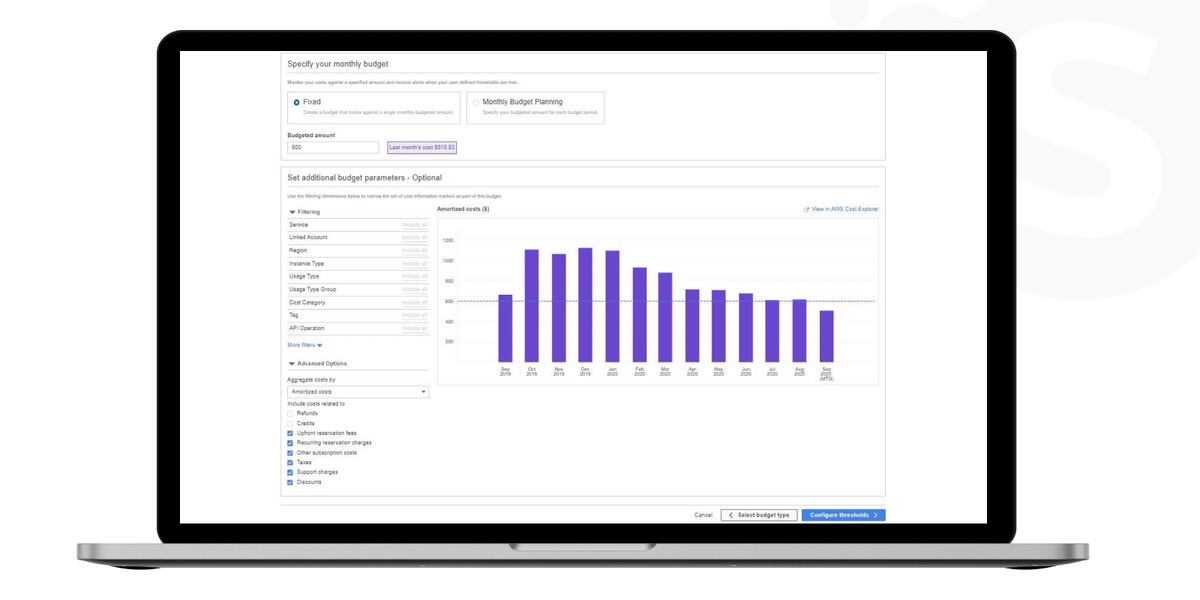
Companies can create budgets based on cost, usage, or reservation coverage and usage. It's possible to set them up for different levels: overall, per service, or per tag. Proactive alerts can notify you when the costs or usage exceed the budgeted amount.
Setting up multiple alerts at different thresholds (e.g., 50%, 75%, 100%) keeps you informed about monthly spending trends. Also, alerts within communication tools (Amazon SNS or email) ensure the team is informed in real time.
Regular Audits and Reviews of AWS Services and Usage
Audits and reviews help to understand service usage patterns and identify underutilized resources. This way, they can uncover different opportunities for cost optimization.
When conducting monthly or quarterly reviews of the AWS environment, examine the following:
- service usage;
- cost trends;
- resource allocation.
It is also crucial to evaluate the performance and cost of each service. Determine if the service is critical and if there are more cost-effective alternatives.
Identify and decommission unused or idle resources. They could be unattached EBS volumes, old snapshots, or underutilized EC2 instances.
Moreover, regularly rightsize instances based on usage patterns to ensure you're not over-provisioned.
Understanding and Utilizing AWS Cost Explorer
AWS Cost Explorer allows users to visualize, understand, and manage AWS costs over time. You can conduct a deep-dive analysis with historical data and detailed filtering to harness its full potential.
Reviewing historical spending and usage trends can uncover patterns. The forecasting feature allows companies to anticipate future costs based on past trends. It aids in budget planning and cost management.
Filters allow users to view data by service, linked account, tags, etc. This approach can also help pinpoint specific cost drivers.
AWS's recommendations for Reserved Instances or Savings Plans can also offer significant savings.
Third-Party Tools for AWS Cost Management
Amazon Web Services provides robust tools for cost management. Yet, several third-party tools can offer extra features, integrations, and analytics.
Comprehensive Dashboards
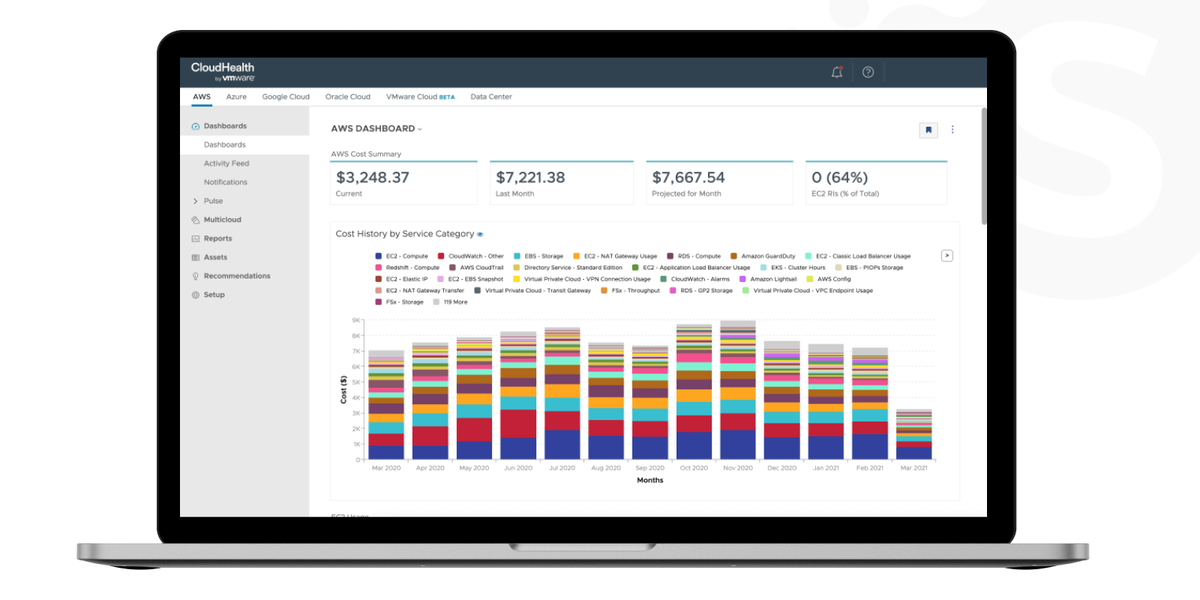
Many services offer reporting features that provide deeper insights into your AWS spending. CloudHealth by VMware breaks down costs, usage, and performance data. Datadog also provides detailed insights into business spending patterns and helps identify areas where to cut costs.
Custom Recommendations
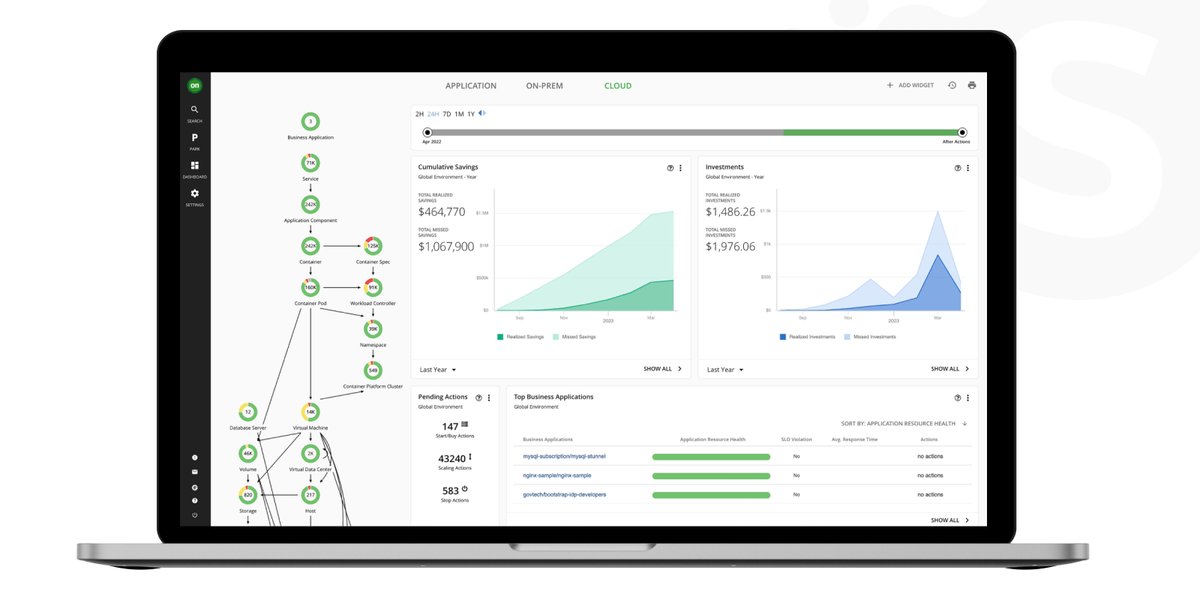
Look for tools that provide recommendations based on your specific usage patterns and configurations. Turbonomic provides an AI-powered platform that continuously analyzes application demands and resource supply.
Automated Actions
Some tools offer the ability to automate actions based on different criteria. For example, GorillaStack can turn off idle resources and manage snapshots to optimize costs.
Conclusion
Efficient AWS cost management is a dynamic and ongoing process. It requires balancing leveraging the right tools and services, regular monitoring and review, and fostering a cost-conscious culture throughout your organization.
Here are some takeaways for efficient AWS cost management:
- Embrace Cost-Efficient Resources. Leverage Spot Instances and Reserved Instances to optimize computing costs.
- Implement Tagging and Monitoring to maintain visibility and control over your spending.
- Regular Audits help identify unused or underutilized resources.
- Data and Storage Optimization. Use lifecycle policies and intelligent tiering in S3 and optimize EBS usage to reduce the cost of AWS storage.
- Optimize databases, considering performance and cost efficiency.
- Third-party tools may offer enhanced insights, recommendations, and automated cost management solutions.
AWS is constantly advancing with new services and pricing models. Stay informed about the latest offerings and how they might benefit your organization. Every team member should be aware of and responsible for the costs they incur in the cloud.
Ready to design your architecture for scalability and flexibility or need personalized guidance? Softermii will help you adjust resources per changing demands and cost structures. Our experts ensure that your cloud infrastructure supports business goals efficiently and economically. Contact us to take the first step towards a more cost-effective AWS journey.
Our experts can help you design a scalable and flexible cloud architecture.
Frequently Asked Questions
Can Reserved Instances always save money compared to On-demand?
Reserved Instances typically offer significant savings over On-demand pricing, sometimes up to 75%. However, they aren't always the most cost-effective option for every scenario. RIs require a commitment to a specific instance type and region for 1 or 3 years. It can lead to wasted spending if your usage changes.
Thus, analyze your usage patterns and predictability of workloads before committing to RIs. For fluctuating workloads, On-demand and Spot Instances might be more cost-effective.
What are the best practices for using Spot Instances without risking performance?
While Spot Instances offer substantial savings, they can be interrupted with little notice. Use them for stateless, fault-tolerant, or flexible applications to mitigate risks.
Is it worth using third-party tools for AWS cost management?
Amazon provides tools like AWS Cost Explorer, Budgets, and Trusted Advisor. But third-party tools can offer additional features, integrations, and perspectives, providing:
However, the value of these tools depends on the size and complexity of your project. For large or complex environments, these insights can lead to significant cost savings on AWS. For smaller setups, native Amazon tools might suffice.
How often should I review my AWS spending and usage?
At a minimum, conduct a monthly review when your bill arrives. Consider setting up weekly or daily alerts and reviews for more dynamic environments.
The more frequently you review, the faster you can address unexpected changes or inefficiencies.
How about to rate this article?
0 ratings • Avg 0 / 5 · Thanks for rating!
Written by:

Co-Founder
Andrii Horiachko is a Co-Founder of Softermii with over 12 years of experience in software development, eight of them spent building and managing Softermii itself. He is responsible for technology-innovation in clients’ projects, making sure every product runs on a modern, carefully chosen tech stack that can sustai…